FME Transformers: 2026.3
 Categories and Related Transformers
Categories
Geometries
Related Transformers
GeometryCopier
GeometryExposer
GeometryNameSetter
MultipleGeometryFilter
GeometryNameExtractor
Extracts geometry names to an attribute.
Typical Uses
- Making geometry names accessible as attribute values for use elsewhere in a workspace
How does it work?
The GeometryNameExtractor receives features of any type and retrieves names from any named geometries that exist on the feature, including multi geometries.
Geometry names are added to a specified attribute. If multi geometry produces more than one name, a list attribute is created.
Features with unnamed geometry receive a blank attribute.
Features without geometry are output unchanged.
Note List attributes are not accessible from the output schema in FME Workbench until they are exposed with an AttributeExposer or processed with a transformer that operates on them, such as a ListExploder or ListConcatenator.
Examples
Example: Retrieving geometry names into an attribute
In this example, we have a set of park polygons. We want to name the geometry, and also use that name elsewhere in the workspace.
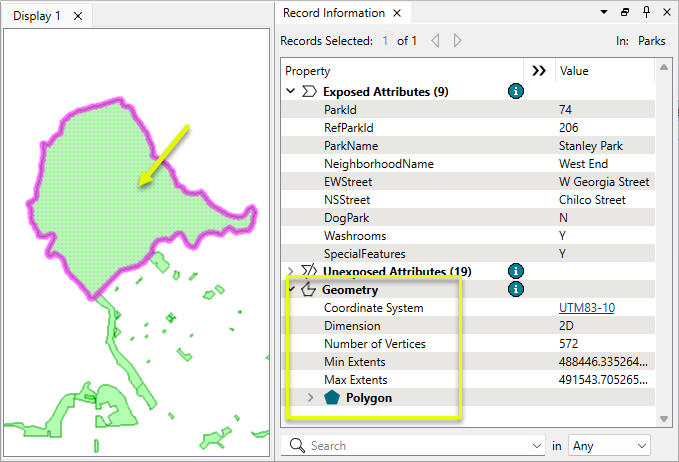
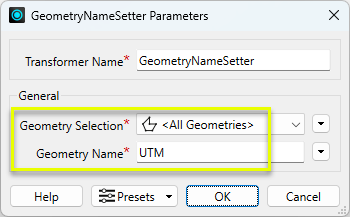
The features are routed into a GeometryNameSetter.

In the parameters dialog, the geometry is given the name UTM.
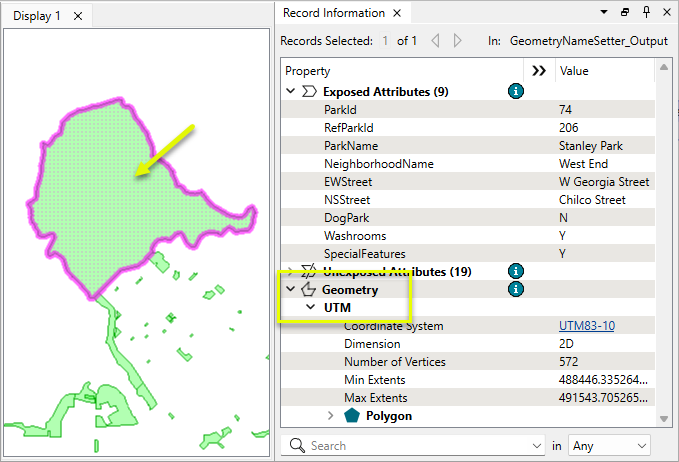
On exit, the features now have named geometry, but that name is not generally accessible to other transformers that do not have geometry selection support.
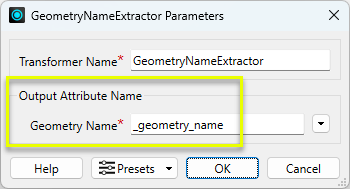
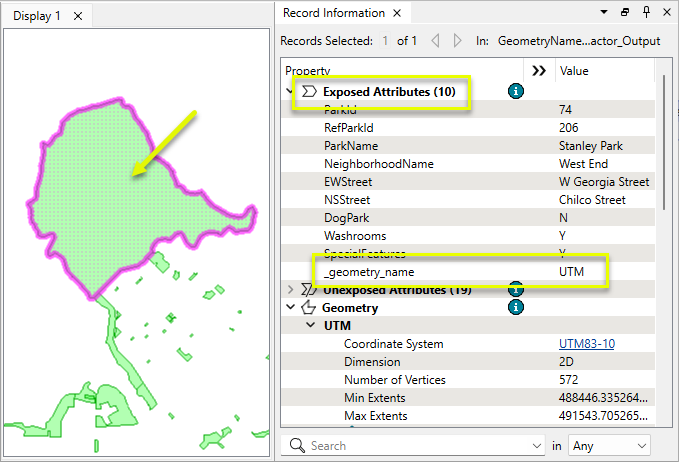
The features are routed into a GeometryNameExtractor. In the parameters dialog, the default attribute name is kept. No other parameters are required.
On exit, the features have a new attribute which contains the name.
Usage Notes
- Named geometries differ from geometry type names such as point, curve, and area. To retrieve geometry types, use the @GeometryType() feature function in any transformer that outputs attributes, such as the AttributeManager.
- This transformer retrieves names but does not make the named geometries available elsewhere in the workspace. The GeometryExposer exposes geometry names for use by transformers and writers, but does not add them to an attribute.
Working with Multiple Geometries
Some formats, such as PostGIS, Oracle Spatial, and Microsoft SQL Server, support multiple geometries on a feature.
They must have unique names, and they have their own coordinate systems and a separate row in the Geometry Definition table.
Multiple geometries are a different concept from aggregates and multis such as MultiPoint.
Multiple Geometries Transformers
|
Transformer |
Use this to... |
|---|---|
|
Add a copy of a feature’s geometry onto itself, either creating or adding to multiple geometry. The copy can then be further processed. |
|
|
Create multiple geometries by merging features based on attribute values and expressions. See Geometry Merge Type > Preserve Distinct Geometries. |
|
|
Create multiple geometries by joining features on attribute values, using left, inner, or full joins. See Geometry Handling > Keep Both (Preserve Distinct Geometries). |
|
|
Assign names to geometries. |
|
|
Put all geometry names into an attribute or list attribute. |
|
|
Make a name available for geometry selection when it is not yet available to downstream transformers. |
|
|
Identify and route features that have multiple geometries. |
|
|
Remove specific geometries by name, or all geometries. Useful for going from multiple geometries to single. |
|
|
Place specific or all geometries into an attribute as a blob. May be useful when paired with the GeometryReplacer for performing transformations on geometry with transformers that do not have geometry selection. |
|
|
Restore geometry from an attribute blob value. |
Transformers with Geometry Selection
These transformers can operate on selected geometries.
Configuration
Input Ports
Input
Features with geometries.
Output Ports
Output
Features with geometry names added to the specified attribute or list attribute.
Parameters
Output Attribute Name
|
Geometry Name |
Name the attribute or list attribute to contain the geometry names. The default is _geometry_name. |
Editing Transformer Parameters
Transformer parameters can be set by directly entering values, using expressions, or referencing other elements in the workspace such as attribute values or user parameters. Various editors and context menus are available to assist. To see what is available, click  beside the applicable parameter.
How to Set Parameter Values
Defining Values
There are several ways to define a value for use in a Transformer. The simplest is to simply type in a value or string, which can include functions of various types such as attribute references, math and string functions, and workspace parameters.
Using the Text Editor
The Text Editor provides a convenient way to construct text strings (including regular expressions) from various data sources, such as attributes, parameters, and constants, where the result is used directly inside a parameter.
Using the Arithmetic Editor
The Arithmetic Editor provides a convenient way to construct math expressions from various data sources, such as attributes, parameters, and feature functions, where the result is used directly inside a parameter.
Conditional Values
Set values depending on one or more test conditions that either pass or fail.
Parameter Condition Definition Dialog
Content
Expressions and strings can include a number of functions, characters, parameters, and more.
When setting values - whether entered directly in a parameter or constructed using one of the editors - strings and expressions containing String, Math, Date/Time or FME Feature Functions will have those functions evaluated. Therefore, the names of these functions (in the form @<function_name>) should not be used as literal string values.
Content Types
| These functions manipulate and format strings. | |
|
Special Characters |
A set of control characters is available in the Text Editor. |
| Math functions are available in both editors. | |
| Date/Time Functions | Date and time functions are available in the Text Editor. |
| These operators are available in the Arithmetic Editor. | |
| These return primarily feature-specific values. | |
| FME and workspace-specific parameters may be used. | |
| Creating and Modifying User Parameters | Create your own editable parameters. |
Dialog Options - Tables
Table Tools
Transformers with table-style parameters have additional tools for populating and manipulating values.
|
Row Reordering
|
Enabled once you have clicked on a row item. Choices include:
|
|
Cut, Copy, and Paste
|
Enabled once you have clicked on a row item. Choices include:
Cut, copy, and paste may be used within a transformer, or between transformers. |
|
Filter
|
Start typing a string, and the matrix will only display rows matching those characters. Searches all columns. This only affects the display of attributes within the transformer - it does not alter which attributes are output. |
|
Import
|
Import populates the table with a set of new attributes read from a dataset. Specific application varies between transformers. |
|
Reset/Refresh
|
Generally resets the table to its initial state, and may provide additional options to remove invalid entries. Behavior varies between transformers. |





Note: Not all tools are available in all transformers.
For more information, see Transformer Parameter Menu Options.
Reference
|
Processing Behavior |
|
|
Feature Holding |
No |
| Dependencies | None |
| Aliases | |
| History |
FME Online Resources
The FME Community and Support Center Knowledge Base have a wealth of information, including active forums with 35,000+ members and thousands of articles.
Search for all results about the GeometryNameExtractor on the FME Community.
Examples may contain information licensed under the Open Government Licence – Vancouver, Open Government Licence - British Columbia, and/or Open Government Licence – Canada.