FME Transformers: 2026.3
 Categories and Related Transformers
Categories
Data Quality
Filters and Joins
Spatial Analysis
Related Transformers
AreaOnAreaOverlayer
Bufferer
Clipper
Intersector
LineOnAreaOverlayer
LineOnLineOverlayer
NeighborFinder
PointOnAreaOverlayer
PointOnLineOverlayer
PointOnPointOverlayer
SpatialFilter
TopologyBuilder
Identifies what types of spatial relationships exist between features.
Typical Uses
- Testing for specific spatial relationships, adding results as attribute values for use elsewhere
- Performing a spatial join to transfer attributes from one feature to another based on their spatial relationship
How does it work?
The SpatialRelator receives two sets of features (points, lines, areas, or text):
- Requestor: Features of interest, to be tested against Suppliers. These features will be output with their test results.
- Supplier: Features to compare to Requestors. These features are not output - they are discarded after use.
Features can be tested for any of these spatial relationships:
- Requestor OGC-Intersects Supplier
- Requestor OGC-Equals Supplier
- Requestor OGC-Touches Supplier
- Requestor OGC-Contains Supplier
- Requestor is OGC-Within Supplier
- Requestor OGC-Crosses Supplier
- Requestor OGC-Overlaps Supplier
Aggregate geometries are not supported by all tests. 9-character masks may also be used- see Dimensionally Extended 9 Intersection Matrix.
Attributes may be acquired from Suppliers. Test results, including spatial relationship type and optional attributes, may be added as a list attribute.
All Output features receive a count of matched Suppliers.
Examples
Example: Finding spatial relationships between lines and areas
In this example, we compare a set of line features (bike paths) with polygons representing city parks. The bike paths are the Requestor - the features we want information about - and the parks are the Supplier that they will be compared to. Only bike paths with added attributes will be output - the parks will be discarded after they have been used to perform the spatial analysis.
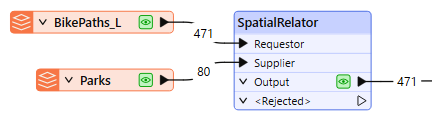
In the SpatialRelator parameters dialog, we make the following selections:
Spatial Predicates to Test: for this case, we will select the spatial relationships we are interested in: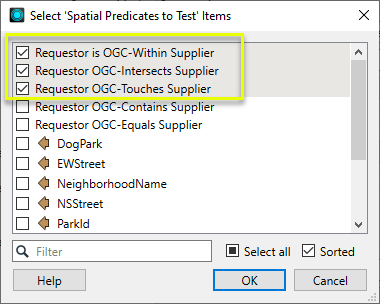
Generate List: generating a list is the default choice, and supports adding attributes for multiple matches. Under Add to List, we choose Selected Attributes, and then select DogPark and ParkName: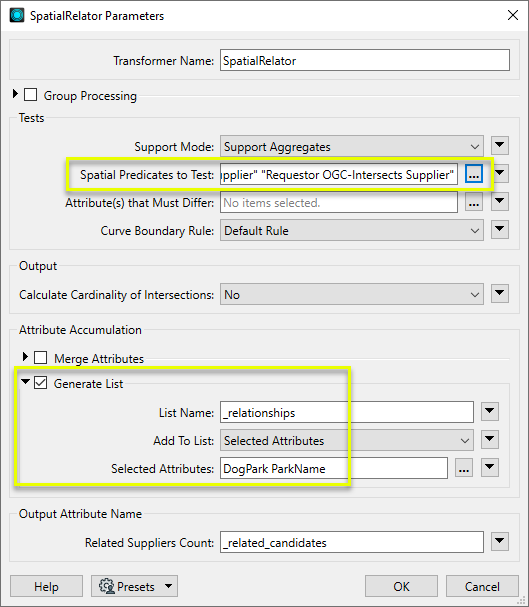
Looking at the results in the FME Data Inspector, with the Parks layer shown for reference, we can see the selected bike path has a _related_candidates attribute showing how many park features it matched.
It crosses from one park into another, and so shows two entries for INTERSECTS in its _relationships list attribute.
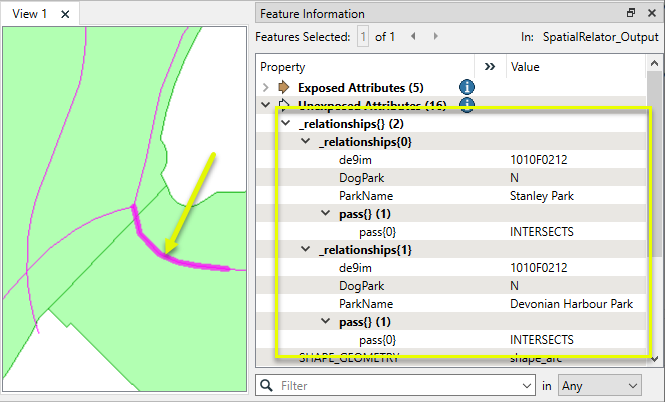
The geometry of the features has not been altered.
Usage Notes
- See Spatial Relations Defined for more information on spatial predicates and an illustration of spatial relationships.
- Spatial relations are based on the OGC specification and so are undefined for geometries that are not OGC valid.
- Aggregates are accepted by a subset of predicates, but should be used with care. See Spatial Relations Defined for more information.
Choosing a Spatial Transformer
Many transformers can assess spatial relationships and perform spatial joins - analyzing topology, merging attributes, and sometimes modifying geometry. Generally, choosing the one that is most specific to the task you need to accomplish will provide the optimal performance results. If there is more than one way to do it (which is frequently the case), time spent on performance testing alternate methods may be worthwhile.
To correctly analyze spatial relationships, all features should be in the same coordinate system. The Reprojector may be useful for reprojecting features within the workspace.
Spatial Transformers Comparison
|
Transformer |
Can Merge Attributes |
Alters Geometry |
Counts Related Features |
Creates List |
Supported Types* |
Recommended For |
|---|---|---|---|---|---|---|
| SpatialFilter | Yes | No | No | No |
|
|
| SpatialRelator | Yes | No | Yes | Yes |
|
|
| AreaOnAreaOverlayer | Yes | Yes | Yes | Yes |
|
|
| LineOnAreaOverlayer | Yes | Yes | Yes | Yes |
|
|
| LineOnLineOverlayer | Yes | Yes | Yes | Yes |
|
|
| PointOnAreaOverlayer | Yes | No | Yes | Yes |
|
|
| PointOnLineOverlayer | Yes | Yes | Yes | Yes |
|
|
| PointOnPointOverlayer | Yes | No | Yes | Yes |
|
|
| Intersector | Yes | Yes | Yes | Yes |
|
|
| Clipper | Yes | Yes | No | No |
|
|
| NeighborFinder | Yes | In some cases | No | Yes |
|
|
| TopologyBuilder | Yes | Yes | No | Yes |
|
|
* Note that Curve includes Lines, Arcs, and Paths. Area includes Polygons, Donuts, and Ellipses.
The Effect of Spatial Transformer Choice on Performance
Spatial analysis can be processing-intensive, particularly when a large number of features are involved. If you would like to tune the performance of your workspace, this is a good place to start.
When there are multiple ways to configure a workspace to reach the same goal, it is often best to choose the transformer most specifically suited to your task.
If performance is an issue in your workspace, look for alternative methods, guided by geometry.
Configuration
Input Ports
Requestor
Point, line, area, or text features that will be tested against Supplier features.
Supplier
Point, line, area, or text features that Requestors are tested against. These features are not output.
Output Ports
Output
Requestor features with added test results and attributes as specified in parameters.
<Rejected>
Requestor and Supplier features with invalid geometries will be rejected and output via this port. If predicates are provided via an attribute, Supplier features with no or invalid predicates will also be output via this port.
Rejected features will have an fme_rejection_code attribute with one of the following values:
INVALID_BASE_GEOMETRY_NOT_OGC_VALID
INVALID_BASE_GEOMETRY_TYPE
INVALID_BASE_GEOMETRY_VERTICES
INVALID_CANDIDATE_GEOMETRY_NOT_OGC_VALID
INVALID_CANDIDATE_GEOMETRY_TYPE
INVALID_CANDIDATE_GEOMETRY_VERTICES
INVALID_CANDIDATE_PARAMETER_PREDICATE
INVALID_GEOMETRY_TYPE
MISSING_CANDIDATE_PARAMETER_PREDICATE
Rejected Feature Handling: can be set to either terminate the translation or continue running when it encounters a rejected feature. This setting is available both as a default FME option and as a workspace parameter.
Parameters
Group Processing
|
Group By |
This parameter is used to indicate that only Requestors and Suppliers that have the same value for specified attributes should be compared. Both the Requestors and Suppliers must having matching attribute names and values. |
||||
|
Complete Groups |
Select the point in processing at which groups are processed:
Considerations for Using Group By
There are two typical reasons for using When Group Changes (Advanced) . The first is incoming data that is intended to be processed in groups (and is already so ordered). In this case, the structure dictates Group By usage - not performance considerations. The second possible reason is potential performance gains. Performance gains are most likely when the data is already sorted (or read using a SQL ORDER BY statement) since less work is required of FME. If the data needs ordering, it can be sorted in the workspace (though the added processing overhead may negate any gains). Sorting becomes more difficult according to the number of data streams. Multiple streams of data could be almost impossible to sort into the correct order, since all features matching a Group By value need to arrive before any features (of any feature type or dataset) belonging to the next group. In this case, using Group By with When All Features Received may be the equivalent and simpler approach. Note Multiple feature types and features from multiple datasets will not generally naturally occur in the correct order.
As with many scenarios, testing different approaches in your workspace with your data is the only definitive way to identify performance gains. |
Tests
|
Support Mode |
Select an option between supporting more geometry types or more predicates:
|
|
Spatial Predicates to Test |
Select one or more tests to perform:
9-Character MasksWhen Support Mode is Support All Predicates, you may test relationships using 9-character masks - a Dimensionally Extended 9 Intersection Matrix. Note that in order to use these masks with the SpatialRelator, you must assign them to an attribute on the Supplier features, and include the value of that attribute in the Tests to Perform clause (you cannot specify them directly). Multiple predicates may be specified in one attribute by separating them with a space. Note that this transformer does not allow a matrix representing a disjoint relationship to be used. This includes any matrix that has F or * in all of the four top-left elements. To find features that are disjoint to another feature, use a SpatialFilter. For more information about predicates, see Spatial Relations Defined. |
|
Attributes that Must Differ |
(Optional) Specify any attributes that must have differing values before a match is declared. |
|
Curve Boundary Rule |
Select the rule to apply to curve geometries:
|
Output
|
Calculate Cardinality of Intersections |
Select an option:
|
Attribute Accumulation
Merge Attributes
When enabled, every Requestor that matches a Supplier receives that supplier feature's attributes.
|
Accumulation Mode |
Select a mode:
|
|
Conflict Resolution |
When Accumulation Mode is Merge Supplier, select a method of handling conflicted attributes:
|
|
Prefix |
When Accumulation Mode is Prefix Supplier, provide a string to prepend to Supplier attribute names. |
Generate List
When enabled, a list attribute is added to Output features with test results, including spatial relationship type and optional Supplier attributes.
The list contains the tested predicate's DE9IM representation and name.
<LIST_NAME>{i}.de9im = [DE9IM string]
<LIST_NAME>{i}.pass{0} = [true PREDICATE 1]
<LIST_NAME>{i}.pass{1} = [true PREDICATE 2]
...
<LIST_NAME>{i}.pass{n} = [true PREDICATE n+1]
|
List Name |
Provide a name for the list attribute. |
|
Add To List |
Select an option for including Supplier attributes in the list:
|
|
Selected Attributes |
When Add To List is Selected Attributes, specify which (if any) Supplier attributes to include. |
Note List attributes are not accessible from the output schema in FME Workbench until they are exposed with an AttributeExposer or processed with a transformer that operates on them, such as a ListExploder or ListConcatenator.
Output Attribute Name
|
Related Suppliers Count |
Name the attribute to contain the number of Suppliers with which the Requestor had at least one true relationship. |
Editing Transformer Parameters
Transformer parameters can be set by directly entering values, using expressions, or referencing other elements in the workspace such as attribute values or user parameters. Various editors and context menus are available to assist. To see what is available, click  beside the applicable parameter.
How to Set Parameter Values
Defining Values
There are several ways to define a value for use in a Transformer. The simplest is to simply type in a value or string, which can include functions of various types such as attribute references, math and string functions, and workspace parameters.
Using the Text Editor
The Text Editor provides a convenient way to construct text strings (including regular expressions) from various data sources, such as attributes, parameters, and constants, where the result is used directly inside a parameter.
Using the Arithmetic Editor
The Arithmetic Editor provides a convenient way to construct math expressions from various data sources, such as attributes, parameters, and feature functions, where the result is used directly inside a parameter.
Conditional Values
Set values depending on one or more test conditions that either pass or fail.
Parameter Condition Definition Dialog
Content
Expressions and strings can include a number of functions, characters, parameters, and more.
When setting values - whether entered directly in a parameter or constructed using one of the editors - strings and expressions containing String, Math, Date/Time or FME Feature Functions will have those functions evaluated. Therefore, the names of these functions (in the form @<function_name>) should not be used as literal string values.
Content Types
| These functions manipulate and format strings. | |
|
Special Characters |
A set of control characters is available in the Text Editor. |
| Math functions are available in both editors. | |
| Date/Time Functions | Date and time functions are available in the Text Editor. |
| These operators are available in the Arithmetic Editor. | |
| These return primarily feature-specific values. | |
| FME and workspace-specific parameters may be used. | |
| Creating and Modifying User Parameters | Create your own editable parameters. |
Dialog Options - Tables
Table Tools
Transformers with table-style parameters have additional tools for populating and manipulating values.
|
Row Reordering
|
Enabled once you have clicked on a row item. Choices include:
|
|
Cut, Copy, and Paste
|
Enabled once you have clicked on a row item. Choices include:
Cut, copy, and paste may be used within a transformer, or between transformers. |
|
Filter
|
Start typing a string, and the matrix will only display rows matching those characters. Searches all columns. This only affects the display of attributes within the transformer - it does not alter which attributes are output. |
|
Import
|
Import populates the table with a set of new attributes read from a dataset. Specific application varies between transformers. |
|
Reset/Refresh
|
Generally resets the table to its initial state, and may provide additional options to remove invalid entries. Behavior varies between transformers. |





Note: Not all tools are available in all transformers.
For more information, see Transformer Parameter Menu Options.
Reference
|
Processing Behavior |
|
|
Feature Holding |
Yes |
| Dependencies | |
| Aliases | |
| History |
FME Online Resources
The FME Community and Support Center Knowledge Base have a wealth of information, including active forums with 35,000+ members and thousands of articles.
Search for all results about the SpatialRelator on the FME Community.
Examples may contain information licensed under the Open Government Licence – Vancouver, Open Government Licence - British Columbia, and/or Open Government Licence – Canada.