Parameter File
 Parameter File to Create
Specify the name of the file to be used as a parameter file. This parameter file is created by the FF reader and is used to store many metadata values for future use with other formats.
Spatial
Coordinate System
Coordinate systems may be extracted from input feature data sources, may come predefined with FME, or may be user-defined. FME allows different output and input coordinate systems, and performs the required coordinate conversions when necessary.
If a coordinate system is specified in both the source format and the workspace, the coordinate system in the workspace is used. The coordinate system specified in the source format is not used, and a warning is logged. If a source coordinate system is not specified in the workspace and the format or system does not store coordinate system information, then the coordinate system is not set for the features that are read.
If a destination coordinate system is set and the feature has been tagged with a coordinate system, then a coordinate system conversion is performed to put the feature into the destination system. This happens right before the feature enters into the writer.
If the destination coordinate system was not set, then the features are written out in their original coordinate system.
If a destination coordinate system is set, but the source coordinate system was not specified in the workspace or stored in the source format, then no conversion is performed. The features are simply tagged with the output system name before being written to the output dataset.
For systems that know their coordinate system, the Coordinate System field will display Read from Source and FME will read the coordinate system from the source dataset. For most other input sources, the field will display Unknown (which simply means that FME will use default values). In most cases, the default value is all you'll need to perform the translation.
You can always choose to override the defaults and choose a new coordinate system. Select More Coordinate Systems from the drop-down menu to open the Coordinate System Gallery.
Changing a Reprojection
To perform a reprojection, FME typically uses the CS-MAP reprojection engine, which includes definitions for thousands of coordinate systems, with a large variety of projections, datums, ellipsoids, and units. However, GIS applications have slightly different algorithms for reprojecting data between different coordinate systems. To ensure that the data FME writes matches exactly to your existing data, you can use the reprojection engine from a different application.
To change the reprojection engine, Select Workspace Parameters > Spatial > Reprojection Engine. In the example shown, you can select Esri (but the selection here depends on your installed applications):

- The coordinate systems file coordsys.db in the FME installation folder contains the names and descriptions of all predefined coordinate systems.
- Some users may wish to use coordinate systems that do not ship with FME, and in those cases, FME also supports custom coordinate systems.
- Learn more about Working with Coordinate Systems in FME.
Polygons
Fix Self-intersecting Polygons
When this option is checked, causes self-intersecting polygons to be broken up into non-intersecting polygons.
Output Polygon Edges
Specifies whether lines used to build polygon geometries should also be read and presented as separate lines.
Use Search Envelope
A search envelope (also known as a bounding box) is a rectangular area that defines a geographic area. In FME, the easiest way to define a search envelope is to use search envelope parameters.
Defining a search envelope is the most efficient method of selecting an area of interest because FME will read only the data that is necessary – it does not have to read an entire dataset. Search Envelope parameters apply to both vector and raster datasets and can be particularly efficient if the source format has a spatial index.
Most FME readers have parameters to define the search envelope of data that is being read:
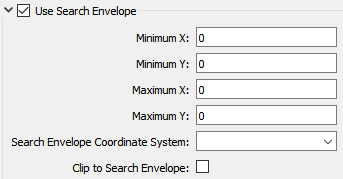
The parameters include the x and y coordinates of the bounding box as well as a parameter that defines the coordinate system.
How to Define the Bounding Box
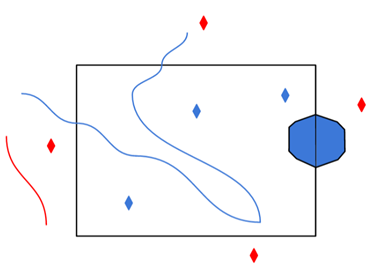
Using the minimum and maximum x and y parameters, define a bounding box that will be used to filter the input features. Only features that intersect with the bounding box are returned. Note that the bounding box intersection is not a full geometry intersection (based on spatial relationships) that would be returned by a transformer like the SpatialFilter.
|
Search Envelope Coordinate System |
Specifies the coordinate system of the search envelope if it is different than the coordinate system of the data. The coordinate system associated with the data to be read must always be set if this parameter is set. If this parameter is set, the minimum and maximum points of the search envelope are reprojected from the Search Envelope Coordinate System to the reader’s coordinate system prior to applying the envelope. |
||||||
|
Clip to Search Envelope |
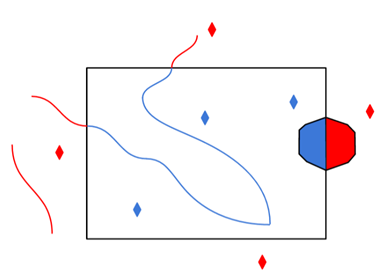
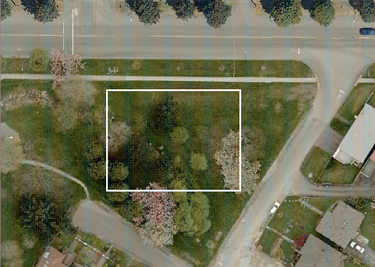
The underlying function for Use Search Envelope is an intersection; however, when Clip to Search Envelope is checked, a clipping operation is also performed.
|
Advanced
Suppress textpoints
Specifies whether texts attached to point geometries should be extracted to standalone texts with their own point geometry.
- Yes – Text-features are made for those points that have a list called ff_text_point{}.
- No – You can choose to create text later by using a ListExploder transformer with the ff_text_point list.
Build clusters
If set to No, clusters are not built.
Build multi geometry clusters
In TransferFiles (FF-files), clusters may have a mix of features with different geometry types, but by default such clusters are not built.
To build clusters with different geometries, specify Yes.
Null height replace value
In FF, a 3D line or area (polygon) is not required to have heights on all vertices.
A vertex with unknown height will have a height value of NaN (Not a Number).
Very few formats allow vertices to have unknown heights, so this parameter allows you to replace all NaN height values with a default height value.
Trim blanks from dep-attribute
The dep-attribute (dep = detail type) is stored on all FF features as a string of 10 characters. Any dep-value shorter than 10 characters will have spaces padded on the left side to make the string 10 characters long. As a standard behavior, FME does not try to trim any values read from an FF file.
If this parameter is set to Yes, FME will trim those spaces from the left side of the dep-value.