Connect the transformer to one or more feature types and click the Transformer properties button. Three columns (Old Attribute, New Attribute, and Default Value) are displayed in the Parameters dialog:
- The Old Attribute column specifies the name of the original attribute. If left empty, the New Attribute will be created with the specified default value.
- The New Attribute column specified the destination attribute name. If left empty, the Old Attribute will be deleted and not appear on the output feature.
- The Default Value column specifies a default value to use if the Old Attribute specified does not exist on the input feature. The value can be a constant, an expression, a published parameter, or a combination of all three.
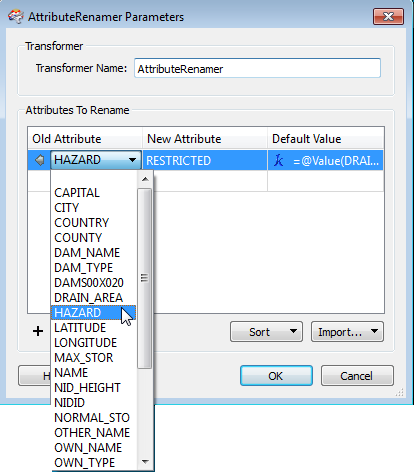
Use the Import button to retrieve data from an external source to populate the various columns of the table.