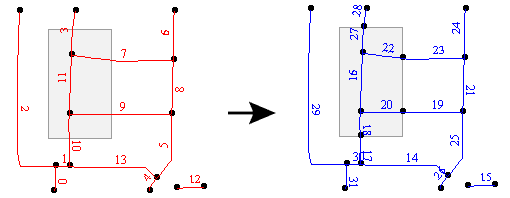
Performs a line-on-area overlay. Each input line is split at any area boundaries it intersects.
The Group By parameter specifies a series of attributes that must match on the features before they are considered for overlaying. This can be used to ensure that the overlay occurs only on certain groups of features. Click the browse button to select from a list of attributes.
The Overlap Count Attribute added to output linear features holds the number of area features that they were inside of. The Overlap Count Attribute added to output area features holds the number of linear features that they contained.
If the optional List Name is supplied, the attributes of each area containing an output line are added to that line's list, and the attributes of each line contained by an output area are added to that area's list. Note that no intersections between area features are computed.
If the Advanced setting Geometry Handling is set to Enhanced in the workspace,arcs are accepted as lines and ellipses accepted as areas preserved as ellipses; otherwise, ellipses are stroked.
If the Advanced setting Geometry Handling is set to Classic in the workspace, the input arc features will be ignored in the output.
Each resulting piece receives the attributes of the area(s) it is contained in, and each containing area receives the attributes of the line. When attributes are merged between features, existing attributes are not replaced. Therefore, if the lines and areas being overlaid have attributes with the same name, then the values will not be transferred from one to the other.
You can avoid this problem by renaming (AttributeRenamer), prefixing (AttributeExpressionRenamer), or removing (AttributeRemover) attributes to avoid name collisions.
About Transformer Parameter Options
FME Professional edition and above
Search for samples and information about this transformer on FMEpedia.