 About Database Connections
|
Database formats include a Database Connection parameter that defines and stores authentication information. For general information about sharing database connections, please see Using Database Connections. Note that Database Connection parameters differ slightly, depending on context and/or database format. |
|
Connection From the Connection parameter in a database format, you can do one of the following:
|
Oracle Workspace
The name of the Oracle Workspace Manager workspace that will be used by the writer. All tables will be written using the same workspace. If this parameter is omitted, or left blank, the default LIVE workspace will be used.
Persistent Connection
If this parameter is checked (default), the Oracle database connection remains open for other requestors. A persistent connection is useful for workspaces that are long-running, or published using FME Flow.
If this parameter is unchecked, the connection to the Oracle database is closed as soon as possible after data processing is complete.
Case Conversion
These parameters change the case of all feature type and attribute names in the output.
Feature Type Names
- UPPERCASE – Change all feature type names to uppercase text.
- lowercase – Change all feature type names to lowercase text.
- None – Do not make changes to any feature type names.
Attribute Names
- UPPERCASE – Change all attribute names to uppercase text.
- lowercase – Change all attribute names to lowercase text.
- None – Do not make changes to any attribute names.
Spatial
Coordinate System
Coordinate systems may be extracted from input feature data sources, may come predefined with FME, or may be user-defined. FME allows different output and input coordinate systems, and performs the required coordinate conversions when necessary.
If a coordinate system is specified in both the source format and the workspace, the coordinate system in the workspace is used. The coordinate system specified in the source format is not used, and a warning is logged. If a source coordinate system is not specified in the workspace and the format or system does not store coordinate system information, then the coordinate system is not set for the features that are read.
If a destination coordinate system is set and the feature has been tagged with a coordinate system, then a coordinate system conversion is performed to put the feature into the destination system. This happens right before the feature enters into the writer.
If the destination coordinate system was not set, then the features are written out in their original coordinate system.
If a destination coordinate system is set, but the source coordinate system was not specified in the workspace or stored in the source format, then no conversion is performed. The features are simply tagged with the output system name before being written to the output dataset.
For systems that know their coordinate system, the Coordinate System field will display Read from Source and FME will read the coordinate system from the source dataset. For most other input sources, the field will display Unknown (which simply means that FME will use default values). In most cases, the default value is all you'll need to perform the translation.
You can always choose to override the defaults and choose a new coordinate system. Select More Coordinate Systems from the drop-down menu to open the Coordinate System Gallery.
Changing a Reprojection
To perform a reprojection, FME typically uses the CS-MAP reprojection engine, which includes definitions for thousands of coordinate systems, with a large variety of projections, datums, ellipsoids, and units. However, GIS applications have slightly different algorithms for reprojecting data between different coordinate systems. To ensure that the data FME writes matches exactly to your existing data, you can use the reprojection engine from a different application.
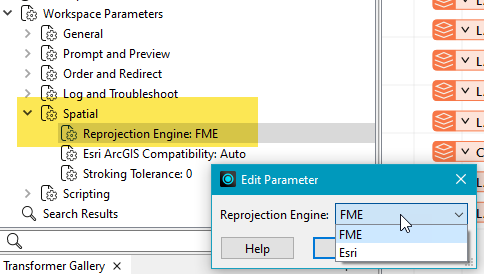
To change the reprojection engine, Select Workspace Parameters > Spatial > Reprojection Engine. In the example shown, you can select Esri (but the selection here depends on your installed applications):
- The coordinate systems file coordsys.db in the FME installation folder contains the names and descriptions of all predefined coordinate systems.
- Some users may wish to use coordinate systems that do not ship with FME, and in those cases, FME also supports custom coordinate systems.
- Learn more about Working with Coordinate Systems in FME.
Create Spatial Index
Indicates whether or not spatial indexes are to be created as part of the data load.
If No is selected, no spatial index creation will be done.
Minimum and Maximum X and Y Ordinate
These values apply to the entire layer – features with coordinate values outside this range will not be correctly indexed.
Contains Z Ordinate
Oracle Spatial Object directly supports composite surfaces, 3D polygons and rectangles. Writing of 3D surfaces and solids is available only for Oracle 11g and above. If the Oracle Spatial Object writer detects an older version of Oracle Database, surface features will automatically be downgraded to a 2D representation prior to writing.
Minimum and Maximum Z Ordinate
Specifies the minimum and maximum Z values expected in the dataset.
Contains Measures
Directs the writer to write measures to the destination table. When this option is checked and the incoming feature does not have any measures, then null values are written. This option applies when writing to existing tables.
However, when creating new tables, the writer takes care of everything including writing to the metadata table. The above parameter is ignored when writing to points, multipoints, multiareas and heterogeneous collections, as Oracle does not support measures for these geometries.
Minimum and Maximum M Ordinate
Specifies the minimum and the maximum measure values expected in the dataset.
Advanced
Always Create Tables
This setting enables the creation of tables without data features.
- No – Tables are only created when receiving data features.
- Yes – Tables are created without data features if possible.
Bulk Write Size
This parameter, also known as chunk size, specifies how many features the writer transmits over the network at a time to the database. Features will get cached in memory until this feature count is reached, and then they will be transmitted as a single chunk to the database. Features Per Transaction is normally a multiple of this parameter. Once all chunks in a transaction are received by the database, the transaction is committed.
This parameter has a significant impact on performance. When the database server is physically remote, round-trip time for data transmission can cause bottlenecks in data loading. To reduce network round-trip time, increase the value of this parameter.
Tip This parameter is often confused with Features Per Transaction. Each bulk write is a part of exactly one transaction. So, if Bulk Write Size is greater than Features Per Transaction, then it is automatically reset to the value of the latter.
Features Per Transaction
This parameter specifies how many features are written to the database before they are committed. It is usually a multiple of Bulk Write Size.
Note that the written feature count is at the writer level and not the feature type level.
- If this parameter is set to a small number: when a transaction fails, only a small number of features (for example, all features in that transaction) get rolled back.
- If this parameter is set to a large number: when a transaction fails, a large number of features get rolled back.
For optimal performance, make Features Per Transaction large (but not excessive), and set Bulk Write Size to the same value.
SQL to Run Before Write
This parameter allows for the execution of SQL statements before writing to a table. For example, it may be necessary to clean up a table before attempting to write to it. The statements will be executed only when the first feature arrives at the writer.
For detailed information about SQL functions, click the corresponding menu item in the SQL to Run editor help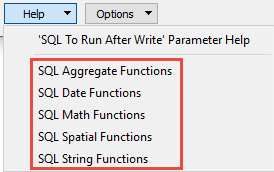 .
.
 to open the editor.
Available menu options depend on the format.
Multiple SQL commands can be delimited by a character specified using the FME_SQL_DELIMITER directive, embedded at the beginning of the SQL block. The single character following this directive will be used to split the SQL block into SQL statements, which will then be sent to the database for execution. Note: Include a space before the character.
For example:
FME_SQL_DELIMITER ;
DELETE FROM instructors ;
DELETE FROM people
WHERE LastName='Doe' AND FirstName='John'
Multiple delimiters are not allowed and the delimiter character will be stripped before being sent to the database.
Any errors occurring during the execution of these SQL statements will normally terminate the reader or writer (depending on where the SQL statement is executed) with an error. If the specified statement is preceded by a hyphen (“-”), such errors are ignored.
SQL to Run After Write
This parameter allows for the execution of SQL statements after a set of tables has been written. For example, it may be necessary to clean up a temporary view after creating it.
For detailed information about SQL functions, click the corresponding menu item in the SQL to Run editor help.
to open the editor.Available menu options depend on the format.
Multiple SQL commands can be delimited by a character specified using the FME_SQL_DELIMITER directive, embedded at the beginning of the SQL block. The single character following this directive will be used to split the SQL block into SQL statements, which will then be sent to the database for execution. Note: Include a space before the character.
For example:
FME_SQL_DELIMITER ;
DELETE FROM instructors ;
DELETE FROM people
WHERE LastName='Doe' AND FirstName='John'
Multiple delimiters are not allowed and the delimiter character will be stripped before being sent to the database.
Any errors occurring during the execution of these SQL statements will normally terminate the reader or writer (depending on where the SQL statement is executed) with an error. If the specified statement is preceded by a hyphen (“-”), such errors are ignored.
Enforce Strict Attribute Conversion
This parameter specifies how the writer proceeds when a problem arises while converting a value from one of a feature’s attributes to an Oracle column value.
Examples of such problems would be the truncation of a string value to fit into the target character column, an error in writing a non-numeric attribute to a numeric column, or an error converting an FME geometry into an SDO_GEOMETRY value.
-
Yes – Features with a conversion problem are logged and dropped from the translation.
-
Warn – The writer logs a warning and writes whatever value the column can hold:
-
For a string that is too long, the string is truncated. Example: "HelloWorld" into VARCHAR2(5) is written as "Hello".
-
For a number with too many decimals, the value is rounded to the column's scale. Example: 1234.56 into NUMBER(5,1) is written as 1234.6.
-
For a timestamp with extra fractional seconds, the extra digits are dropped. Example: "2026-01-15 10:30:00.1234" into TIMESTAMP(3) is written as "2026-01-15 10:30:00.123".
-
When the value cannot be stored at all, the column is written as NULL. Examples: 12345 into NUMBER(3,0) (too many digits), "not a number" into a NUMBER column, "not a date" into a TIMESTAMP column.
-
-
No – Same results as Warn, but no warnings are logged.