
FME Form: 2026.2
Looping Transformers
Note Workspaces created prior to FME version 2026.2 implement looping through custom transformers. For more information, see Looping Custom Transformers.
You can arrange for a transformer or a string of transformers to run multiple times, or "loop," until certain conditions are met. When you loop transformers, any features that enter the transformer loop are sent back to the loop input if those conditions are not yet met. Loops often contain transformers such as testers and filters that are used to determine end conditions.
Note Nesting transformer loops within other loops is supported.
An example of where looping may be useful is when you want to create an iteration of buffers around a feature, using a Bufferer transformer, and continuously check for neighboring features, using a NeighborFinder transformer, until a neighbor is either found or not found.
Creating a Transformer Loop
- Select the transformers you want to loop and click Loop on the toolbar, or enter Ctrl + L. Alternatively, right-click on the selection and select Create Loop. You can also right-click anywhere on the canvas, select Insert Loop, then drag and adjust the loop block over the desired transformers.
- Create a connection from the input port of the first transformer in the loop to the loop output port in the lower left corner of the loop block.
- Create a connection from the output port of the last transformer in the loop to the loop input port in the lower right corner of the loop block.
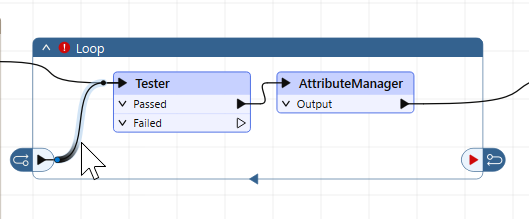
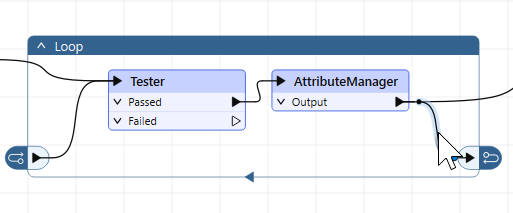
Testing, Debugging, and Setting Loop Behavior and Properties
Click on the title bar of the loop block, then click the gear icon on the mini-toolbar above the title bar. In the Edit Loop Parameters dialog, use the following settings for testing and debugging loops, and controlling loop behavior and properties:
- Loop Name: Provide a meaningful name for the loop, if desired.
- Loop Limit: The maximum number of times the loop runs. Use this setting to prevent a loop from running infinitely or otherwise exiting a loop after a defined iteration count.
- Iteration Number Attribute: The name of the attribute that defines the iteration count of the loop (defaults to _iteration_num). Use this attribute in conjunction with Data Inspection to see which iteration any particular feature passes through a loop.
When a transformer loop runs, the iteration count (number of times it runs) records in the title bar:

To Disable or Enable a Loop
Disabling a loop prevents all transformers inside the loop from running.
To disable (or re-enable), click on the title bar of the loop block, then click the disable/enable icon on the mini-toolbar above the title bar.
To Export a Loop to a Custom Transformer
Right-click inside the loop block and select Create Custom Transformer.
Note Creating loops inside custom transformers is supported.
For more information, see About Custom Transformers.