Autodesk Navisworks Reader Parameters
Specify Models to Read
When enabled, this parameter allows you to select specific models to read from a Navisworks dataset.
The models available for selection are given based on the method by which they are linked to the Navisworks dataset.
For example:
- Models that are linked directly to the Navisworks dataset will be listed with their native extension (.rvt).
- Models imported into the Navisworks dataset itself will be listed with a Navisworks extension (.nwd or .nwc).
Materials
Texture Folders
This parameter specifies the folder(s) that the reader will search to find the texture image files referenced by the files being read.
In addition to any folders added here, the folder will search the location referenced within the file, the folder containing the source dataset, and a special subfolder <SourceDatasetName>.texture.
Schema Attributes
 Additional Attributes to Expose
Additional Attributes to Expose
Use this parameter to expose Format Attributes in FME Workbench when you create a workspace:
- In a dynamic scenario, it means these attributes can be passed to the output dataset at runtime.
- In a non-dynamic scenario, this parameter allows you to expose additional attributes on multiple feature types. Click the browse button to view the available format attributes (which are different for each format) for the reader.
Use Search Envelope
Use Search Envelope
|
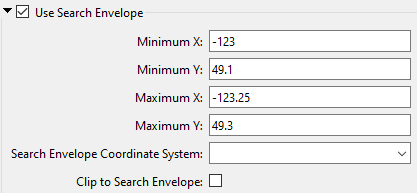
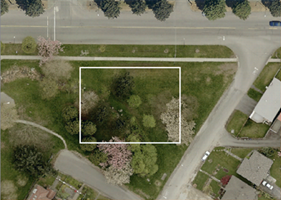
A search envelope (also known as a bounding box) is a rectangular area that defines a geographic area. In FME, the easiest way to define a search envelope is to use search envelope parameters. Defining a search envelope is the most efficient method of selecting an area of interest because FME will read only the data that is necessary – it does not have to read an entire dataset. Search Envelope parameters apply to both vector and raster datasets and can be particularly efficient if the source format has a spatial index. Most FME readers have parameters to define the search envelope of data that is being read:
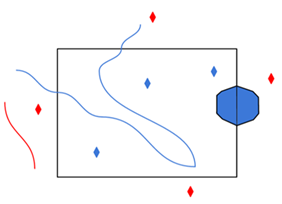
The parameters include the x and y coordinates of the bounding box as well as a parameter that defines the coordinate system. How to Define the Bounding Box Using the minimum and maximum x and y parameters, define a bounding box that will be used to filter the input features. Only features that intersect with the bounding box are returned. Note that the bounding box intersection is not a full geometry intersection (based on spatial relationships) that would be returned by a transformer like the SpatialFilter. Note If all four coordinates of the search envelope are left at 0, the search envelope will be disabled even if this option is checked.
|
|||||||
|
Search Envelope Coordinate System |
Specifies the coordinate system of the search envelope if it is different than the coordinate system of the data. The coordinate system associated with the data to be read must always be set if this parameter is set. If this parameter is set, the minimum and maximum points of the search envelope are reprojected from the Search Envelope Coordinate System to the reader’s coordinate system prior to applying the envelope. |
||||||
|
Clip to Search Envelope |
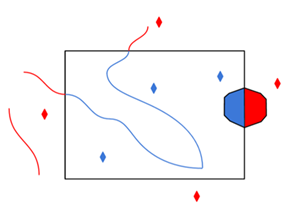
The underlying function for Use Search Envelope is an intersection; however, when Clip to Search Envelope is checked, a clipping operation is also performed.
|
||||||