Name
The name of the shapefile to be written.
Type
Choose one of the following field types.
 char
char
Character fields store fixed-length strings. When a character field is written, it is right-padded with spaces, or truncated, to fit the width. When a character field is retrieved, any padding space characters are stripped away.
date
Temporal (date) field composed of year, month and date; ranging from January 1, 0001, to December 31, 9999.
Field size: 4 bytes
More information on FME and Date Format.
logical
Logical fields store TRUE/FALSE data. Data read to or written from such fields must always have a value of either true or false.
number
Number fields store single and double precision floating point values. The decimals parameter controls the precision of the data and is the number of digits to the right of the decimal.
Additional digits will be rounded off.
Width
The width parameter controls the maximum characters that can be stored by the field. For the number type, the width parameter is the total number of characters allocated to the field, including the decimal point.
Index
Writing Attribute Indexes
The Shape writer can index shape data by attribute and produce attribute index files. These files are named as <featureClass>.<attributeName>.atx. FME attempts to index all attributes that are flagged as INDEX in the user attributes tab of the FME Workbench Feature Type Properties.
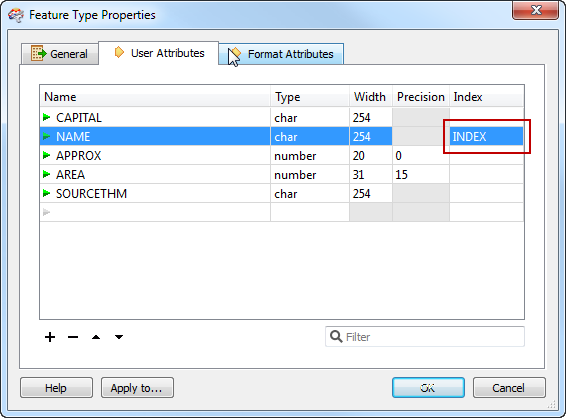
Any attribute of type char or number that is indexed must be maximum 80 characters wide. Additionally, attribute names cannot contain characters that are illegal in Windows filenames.
If any attributes are flagged for indexing, FME automatically produces spatial index files for the feature type, regardless of the Write Spatial Index setting in the FME Workbench writer parameters dialog. For more information, see the writer parameter Write Spatial Index.
Writing attribute indexes requires that FME is running on a machine with ArcGIS installed.