Finds the closest CANDIDATE feature within a specified maximum distance of each BASE feature.
If a feature is routed to both the BASE and the CANDIDATE input ports, then features will be compared to themselves as they are both a BASE and CANDIDATE.
If there is only a connection made to the CANDIDATE port, but not to the BASE port, then all CANDIDATEs will be compared with all other CANDIDATEs, but will not be compared to themselves.
If there are no CANDIDATE features found to be within the maximum distance, then the BASE feature will be output unchanged via the UNMATCHED_BASE port.
CANDIDATE features not close enough to any BASE feature are output via the UNMATCHED_CANDIDATE port.
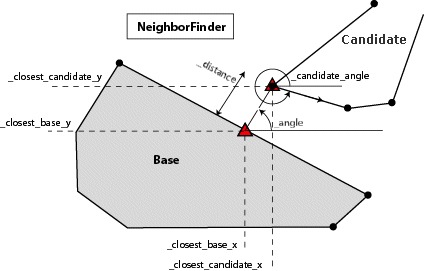
If a CANDIDATE feature is found, then all the attributes from the closest CANDIDATE feature are added to the BASE feature and the BASE feature is output via the MATCHED port. In addition, several other attributes are added to the BASE feature just prior to it being output via the MATCHED port:
| Attributes | Description |
|---|---|
| _distance | The distance from the BASE to the matching CANDIDATE |
| _angle | The angle between the closest interpolated BASE point and the closest interpolated CANDIDATE point. |
| _closest_base_x, _closest_base_y | The coordinates of the closest interpolated point on the BASE feature relative to the CANDIDATE feature. |
| _closest_candidate_x, _closest_candidate_y | The coordinates of the closest interpolated point on the CANDIDATE feature relative to the BASE feature. |
| _candidate_angle | The angle from (_closest_candidate_x, _closest_candidate_y) to the next vertex within the CANDIDATE feature. If (_closest_candidate_x, _closest_candidate_y) equals the last vertex of the CANDIDATE feature, then candidate_angle will be the angle from the previous vertex of the CANDIDATE feature to (_closest_candidate_x, _closest_candidate_y). |
| _candidate_label_angle | The _candidate_angle adjusted so that if it is used as a text rotation, the text will run from left to right. This angle is guaranteed to be greater than or equal to 270 and less than 360, or greater than or equal to 0 and less than or equal to 90. |
Invalid features (i.e. extra candidates) are output via the <REJECTED> port.
The default behavior is to use the entire set of input features as the group. This option allows you to select attributes that define which groups to form. Each set of features that have the same value for all of these attributes will be processed as an independent group.
How parallel processing works with FME: see About Parallel Processing for detailed information.
This parameter determines whether or not the transformer should perform the work across parallel processes. If it is enabled, a process will be launched for each group specified by the Group By parameter.
| Parameter | Number of Processes |
|---|---|
| No Parallelism | 1 |
| Minimal | coresThe processor, or CPU, is the physical part of the computer that performs mathematical calculations. It is the most important part of a computer system. Traditional processors have only one core on the processor, meaning that at any given time, only one set of calculations is being performed. If a processor is dual-core, this means the single chip contains hardware for two processors, now called cores to distinguish them from the single chip, running simultaneously, side by side. (Source: http://www.ehow.com/facts_5730257_computer-core-processors_.html) / 2 |
| Moderate | exact number of cores |
| Aggressive | cores x 1.5 |
| Extreme | cores x 2 |
For example, on a quad-core machine, minimal parallelism will result in two simultaneous FME processes. Extreme parallelism on an 8-core machine would result in 16 simultaneous processes.
You can experiment with this feature and view the information in the Windows Task Manager and the Workbench Log window.
The maximum distance is measured in the units of coordinates of the input features.
The list contains all of the candidate features that were within the maximum distance of the base.
To get the distance from a given BASE to all CANDIDATE features, use a very large number for this parameter and specify a Close Candidate List Name.
If Insert Vertex on BASE feature is Yes, then (_closest_base_x, _closest_base_y) will be inserted onto the BASE feature if the insertion is well-defined. For example, if a CANDIDATE polygon is contained inside a BASE polygon, insertion will not take place.
If Insert vertex on BASE feature is Yes, the _closest_base_x, _closest_base_y vertex will be inserted onto to the BASE feature as well as added as an attribute. This option only applies to Lines, Polygons, Paths, Arcs, Ellipses, and Donuts.
If set to Yes, then all CANDIDATE features must be input before any BASE features. If a CANDIDATE feature is input after a BASE feature and this option is set to Yes, the CANDIDATE feature will be ignored in all calculations.
If specified, a list will be built on the MATCHED output, consisting of all the attributes from the CANDIDATE features that were within maximum distance of the BASE feature.
If specified, a list will be built on the MATCHED output, consisting of all the attributes from the CANDIDATE features whose bounding boxes were within maximum distance of the bounding box of the BASE feature.
If the Advanced setting Geometry Handling is set to Enhanced in the workspace, arcs and ellipses will have their boundaries considered in distance calculations; otherwise, their centerpoints will be used.
About Transformer Parameter Options
All angles are measured in degrees counterclockwise from horizontal. Where angles are not well-defined (for example, when a CANDIDATE polygon is contained inside a BASE polygon), they are set to 0.
This transformer works with 2D geometries only; if an input geometry is 3D, its z-coordinate will be ignored.
This transformer has full support for points, lines, arcs, ellipses, polygons, and donuts, and has limited support for other types of geometry. Polygons, ellipses and donuts may be processed as lines or areas, depending on user selection.
FME Professional edition and above
See the NeighborFinder page in FMEpedia for additional information and examples that use this transformer.
Search for samples and information about this transformer on FMEpedia.
Keywords: MBR "minimum bounding rectangle" neighbourfinder