
Always Create Sheets
After running a translation, there can be some scenarios when an expected worksheet was not created because no data features reached the writer.
The Always Create Sheets parameter allows writers to create worksheets when no data features arrive, or if the writer is not connected to anything. This parameter is disabled (set to No) by default, but can be enabled (set to Yes) under the Advanced parameters for supported formats.
The creation of worksheets without data features relies on the writer's ability to determine how a worksheet should look with the available information. If the available information is insufficient, the worksheet will not be created.
Worksheet Handling
The worksheet handling option is honored when creating worksheet without data features. For example, if the writer feature type parameter Worksheet Handling is set to Drop and Create, the writer will drop the worksheet and recreate it.
Static Feature Types
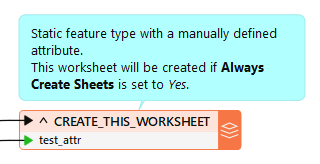
Static Feature Types means that the feature type and its attributes are defined prior to running the translation.
There are two cases where a worksheet can be created using Always Create Sheets:
- The writer is connected to an incoming data pipe, and Attribute Definition (User Attributes tab) is set to either Automatic or Manual.
- The writer is not connected to any incoming data pipe, and Attribute Definition (User Attributes tab) is set to Manual.
In these two cases, the worksheets will be created at the end of a translation if no data features arrive at the writer/destination feature type.
Dynamic Feature Types
Dynamic Feature Types means that the feature type name and its attributes are determined during the translation.
In this case, worksheets will only be created without data features if the Schema Source is Schema From Schema Feature.
At the end of a translation, any schema features which were not used for any data features will have a worksheet created using the value of fme_feature_type_name from the schema feature. Note that schema features can be used for worksheets that have a different name.