 About Database Connections
|
Database formats include a Database Connection parameter that defines and stores authentication information. For general information about sharing database connections, please see Using Database Connections. Note that Database Connection parameters differ slightly, depending on context and/or database format. |
|
Connection From the Connection parameter in a database format, you can do one of the following:
|
Connection Parameters
Host
This specifies the machine running the Redshift ORDBMS as either an IP address or host name. The database must have proper permissions and be set up to accept TCP/IP connections if connecting from a remote machine.
Port
When connecting remotely, this specifies the TCP/IP port on which to connect to the ORDBMS service. The default port is 5439.
Database
This specifies the name of the Redshift database. The database must exist in the ORDBMS.
Username and Password
Enter the username and password to access the service.
Case Conversion
These parameters change the case of all feature type and attribute names in the output.
Feature Type Names
- UPPERCASE – Change all feature type names to uppercase text.
- lowercase – Change all feature type names to lowercase text.
- None – Do not make changes to any feature type names.
Attribute Names
- UPPERCASE – Change all attribute names to uppercase text.
- lowercase – Change all attribute names to lowercase text.
- None – Do not make changes to any attribute names.
Spatial
Coordinate System
Coordinate systems may be extracted from input feature data sources, may come predefined with FME, or may be user-defined. FME allows different output and input coordinate systems, and performs the required coordinate conversions when necessary.
If a coordinate system is specified in both the source format and the workspace, the coordinate system in the workspace is used. The coordinate system specified in the source format is not used, and a warning is logged. If a source coordinate system is not specified in the workspace and the format or system does not store coordinate system information, then the coordinate system is not set for the features that are read.
If a destination coordinate system is set and the feature has been tagged with a coordinate system, then a coordinate system conversion is performed to put the feature into the destination system. This happens right before the feature enters into the writer.
If the destination coordinate system was not set, then the features are written out in their original coordinate system.
If a destination coordinate system is set, but the source coordinate system was not specified in the workspace or stored in the source format, then no conversion is performed. The features are simply tagged with the output system name before being written to the output dataset.
For systems that know their coordinate system, the Coordinate System field will display Read from Source and FME will read the coordinate system from the source dataset. For most other input sources, the field will display Unknown (which simply means that FME will use default values). In most cases, the default value is all you'll need to perform the translation.
You can always choose to override the defaults and choose a new coordinate system. Select More Coordinate Systems from the drop-down menu to open the Coordinate System Gallery.
Changing a Reprojection
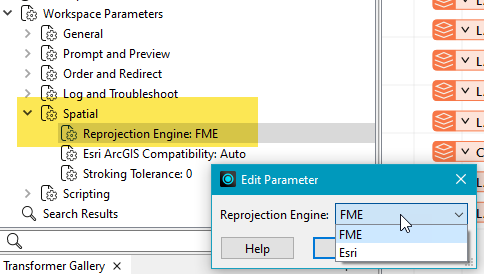
To perform a reprojection, FME typically uses the CS-MAP reprojection engine, which includes definitions for thousands of coordinate systems, with a large variety of projections, datums, ellipsoids, and units. However, GIS applications have slightly different algorithms for reprojecting data between different coordinate systems. To ensure that the data FME writes matches exactly to your existing data, you can use the reprojection engine from a different application.
To change the reprojection engine, Select Workspace Parameters > Spatial > Reprojection Engine. In the example shown, you can select Esri (but the selection here depends on your installed applications):
- The coordinate systems file coordsys.db in the FME installation folder contains the names and descriptions of all predefined coordinate systems.
- Some users may wish to use coordinate systems that do not ship with FME, and in those cases, FME also supports custom coordinate systems.
- Learn more about Working with Coordinate Systems in FME.
Advanced
Starting Feature
The number at which the writer will start writing features into the database. The writer skips the number of features in this parameter, and then it begins writing the features that follow.
Usually, the value specified is 0 (which is the default) – a non-zero value is usually only specified when a data load operation is being resumed after failing partway through.
Features Per Transaction
The number of features that FME places in each transaction before a transaction is committed to the database.
If the parameter is set to 0, then the entire write operation occurs in a single transaction.
Default: 1000