The Open Data Protocol (OData) is a web protocol for querying and updating data that builds upon web technologies such as HTTP, Atom Publishing Protocol (AtomPub) and JSON to provide access to remote information.
The OData specification defines the request and response rules for the retrieval of both spatial and non-spatial geographic information using either ATOM or JSON. This reader retrieves data through JSON. While some feeds may be stored as ATOM, it is possible for them to also be read as JSON given that they are using API version 2.0 or later.
Connection Parameters
 Service URL
This parameter should contain the service root URI of an OData service. This should point to a valid OData service document which is able to return a list of feeds available for consumption.
Each feed will generate its own feature type.
A URI used to query an OData service has up to three significant parts: the service root URI, resource path, and query string options. Only the service Root URI should be specified.
For example:

A typical URI specifying an OData service looks like:
ODATA_DATASET http://services.odata.org/OData/OData.svc/
Authentication
If the OData service requires Basic, NTLM, or Web Connection authentication, specify it here.
Username and Password
These fields are enabled when authentication is in use.
Web Connection
Opens the Edit Web Connection dialog, from which you can specify the Web Service to use for authentication.
Web connections provide a convenient and secure way to store and reuse web connection parameters.
For general information about web connections, please see Using Web Connections.
Constraints
Spatial Type
OData versions 3.0 and later provide support for spatial data in two types: geography and geometry.
This parameter allows you to choose which type will be used as the feature geometry. The spatial type that is not selected will be treated as an attribute on the schema, where its GeoJSON data will be taken as the attribute values.
| Source Geometry Type |
Supports |
Coordinate System |
Result |
|---|---|---|---|
|
Geography |
points, lines, polygons, and collections |
EPSG:4326 |
All OData properties within a feed that are geography types will be aggregated onto the feature geometry. All geometry types will be treated as attributes. |
|
Geometry |
points, lines, polygons, and collections |
None |
All OData properties within a feed that are geometry types will be aggregated onto the feature geometry. All geography types will be treated as attributes. |
|
None |
|
|
All OData properties within a feed that are either geometry or geography types will be treated as attributes. There will be no feature geometry. |
Feeds
A list of feeds in the OData service for which to generate feature types. After entering a valid OData service root URI, click the browse [...] button to list the feeds contained in the service.
Query Options
The available query options are Order By, Filter, and Expand. All fields are optional.
System query options are query string parameters that control the amount and order of the data returned for the resource identified by the URL. The names of all system query options are optionally prefixed with a dollar ($) character. OData Protocol V4.01 based services support case-insensitive system query option names specified with or without the $ prefix. Clients that want to work with 4.0 services must use lowercase names and specify the $ prefix.
See examples in the table below. For greater detail on these query options, visit Microsoft Query Options Overview.
|
Query Option |
Description |
Example |
Result |
Equivalent Query Parameter (examples from Query Options Overview) |
|---|---|---|---|---|
|
Order By |
Request resources in a particular order. |
ProductID |
Orders results by Product ID in descending order. |
This is equivalent to specifying $orderby as query parameter in the following request URL: http://odata/service/Categories?$orderby=ProductID |
|
Filter |
Filter a collection of resources that are addressed by a request URL. |
ProductID gt 5 |
Returns results where the product id is greater than 5. |
This is equivalent to specifying $filter as query parameter in the following request URL: http://odata/service/Categories?$filter=ProductID gt 5 |
|
Expand |
Specify the related resources or media streams to be included in line with retrieved resources. |
Products |
Expands the Products key as JSON. To expose this attribute, you will need to specify it in the workspace: Open the Feature Type parameters and click the User Attributes tab. |
This is equivalent to specifying $expand as query parameter in the following request URL: http://odata/service/Categories?$expand=Products |
Schema Attributes
Additional Attributes to Expose
Use this parameter to expose Format Attributes in FME Workbench when you create a workspace:
- In a dynamic scenario, it means these attributes can be passed to the output dataset at runtime.
- In a non-dynamic scenario, this parameter allows you to expose additional attributes on multiple feature types. Click the browse button to view the available format attributes (which are different for each format) for the reader.
Spatial
Coordinate System
Coordinate systems may be extracted from input feature data sources, may come predefined with FME, or may be user-defined. FME allows different output and input coordinate systems, and performs the required coordinate conversions when necessary.
If a coordinate system is specified in both the source format and the workspace, the coordinate system in the workspace is used. The coordinate system specified in the source format is not used, and a warning is logged. If a source coordinate system is not specified in the workspace and the format or system does not store coordinate system information, then the coordinate system is not set for the features that are read.
If a destination coordinate system is set and the feature has been tagged with a coordinate system, then a coordinate system conversion is performed to put the feature into the destination system. This happens right before the feature enters into the writer.
If the destination coordinate system was not set, then the features are written out in their original coordinate system.
If a destination coordinate system is set, but the source coordinate system was not specified in the workspace or stored in the source format, then no conversion is performed. The features are simply tagged with the output system name before being written to the output dataset.
For systems that know their coordinate system, the Coordinate System field will display Read from Source and FME will read the coordinate system from the source dataset. For most other input sources, the field will display Unknown (which simply means that FME will use default values). In most cases, the default value is all you'll need to perform the translation.
You can always choose to override the defaults and choose a new coordinate system. Select More Coordinate Systems from the drop-down menu to open the Coordinate System Gallery.
Changing a Reprojection
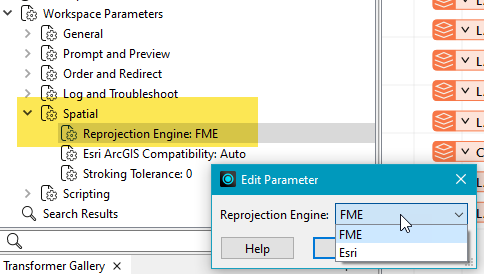
To perform a reprojection, FME typically uses the CS-MAP reprojection engine, which includes definitions for thousands of coordinate systems, with a large variety of projections, datums, ellipsoids, and units. However, GIS applications have slightly different algorithms for reprojecting data between different coordinate systems. To ensure that the data FME writes matches exactly to your existing data, you can use the reprojection engine from a different application.
To change the reprojection engine, Select Workspace Parameters > Spatial > Reprojection Engine. In the example shown, you can select Esri (but the selection here depends on your installed applications):
- The coordinate systems file coordsys.db in the FME installation folder contains the names and descriptions of all predefined coordinate systems.
- Some users may wish to use coordinate systems that do not ship with FME, and in those cases, FME also supports custom coordinate systems.
- Learn more about Working with Coordinate Systems in FME.
Advanced
Features Per Request
Specifies how many features to request from the OData service in a single request. The OData reader will issue paginated requests until all features are read.
If this parameter is not provided, then the OData reader will read as many features as the server returns in a single request, and automatically obey any server-side pagination.
Default: 1000
OData Version Header
Use this parameter to request a specific OData response format version from the server. It is possible to explicitly request responses compliant with OData version 2.0 or OData version 4.0.
Verify HTTPS Certificate
- Yes (default) – Ensures that a URL's digital certificate is valid (signed by a trusted certificate authority), trusted, and belongs to the domain to which you are connecting.
- No – Verification will not be performed (that is, there is no verification that the URL’s certificate is valid or trusted).
How FME Processes Multiple Verification Parameters in a Workspace
FME evaluates the setting at the workspace component level. If a reader/writer or web connection has the Verify HTTPS Certificate(s) parameter set to Yes, and an HTTPCaller transformer has the Verify HTTPS Certificate(s) parameter set to No, then the reader will verify certificates for its data requests, but the transformer will not verify certificates for its own requests.
FME does not combine multiple verification parameters — it uses the parameter local to the reader/writer, transformer, or web connection that is making the web call.
It is good practice to ensure that all Verify HTTPS Certificate(s) parameters in a workspace are set to Yes.
- On MacOS, requests to some servers will not work unless this parameter is set to Yes.
- The value of the Verify HTTPS Certificate parameter takes priority over the value of the Verify SSL Certificates parameter, which may be defined by the Web Connection used with this format.
Connection Time Out
The number of seconds that requests will wait for your client to establish a connection to the OData service.
Default: 120