 IFC Version
This parameter specifies the IFC version the writer will produce. Possible versions are IFC2x3 and IFC4. While IFC4 is the default value, many applications are not yet able to import this data, so it may be necessary to change the output version to IFC2x3.
GUID Seed Value
If this parameter is blank, the IFC writer will generate random GlobalId values for IFC objects. If the parameter value is non-empty, it will be used as a seed value for the GUID generator. This means that the GlobalId values generated by the writer will be reproducible from one workspace to the next. Objects with the same type, which arrive at the writer in the same order, will always have the same GlobalId, so long as the seed value doesn’t change.
This only applies to objects for which a new GlobalId value is required. If a feature arrives at the writer and the GlobalId attribute is already set to a valid GUID, that value will be used instead of using a newly generated value.
Spatial
Coordinate System
Coordinate systems may be extracted from input feature data sources, may come predefined with FME, or may be user-defined. FME allows different output and input coordinate systems, and performs the required coordinate conversions when necessary.
If a coordinate system is specified in both the source format and the workspace, the coordinate system in the workspace is used. The coordinate system specified in the source format is not used, and a warning is logged. If a source coordinate system is not specified in the workspace and the format or system does not store coordinate system information, then the coordinate system is not set for the features that are read.
If a destination coordinate system is set and the feature has been tagged with a coordinate system, then a coordinate system conversion is performed to put the feature into the destination system. This happens right before the feature enters into the writer.
If the destination coordinate system was not set, then the features are written out in their original coordinate system.
If a destination coordinate system is set, but the source coordinate system was not specified in the workspace or stored in the source format, then no conversion is performed. The features are simply tagged with the output system name before being written to the output dataset.
For systems that know their coordinate system, the Coordinate System field will display Read from Source and FME will read the coordinate system from the source dataset. For most other input sources, the field will display Unknown (which simply means that FME will use default values). In most cases, the default value is all you'll need to perform the translation.
You can always choose to override the defaults and choose a new coordinate system. Select More Coordinate Systems from the drop-down menu to open the Coordinate System Gallery.
Changing a Reprojection
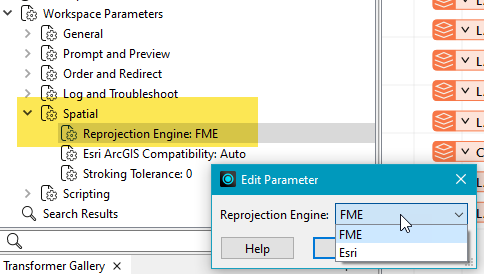
To perform a reprojection, FME typically uses the CS-MAP reprojection engine, which includes definitions for thousands of coordinate systems, with a large variety of projections, datums, ellipsoids, and units. However, GIS applications have slightly different algorithms for reprojecting data between different coordinate systems. To ensure that the data FME writes matches exactly to your existing data, you can use the reprojection engine from a different application.
To change the reprojection engine, Select Workspace Parameters > Spatial > Reprojection Engine. In the example shown, you can select Esri (but the selection here depends on your installed applications):
- The coordinate systems file coordsys.db in the FME installation folder contains the names and descriptions of all predefined coordinate systems.
- Some users may wish to use coordinate systems that do not ship with FME, and in those cases, FME also supports custom coordinate systems.
- Learn more about Working with Coordinate Systems in FME.
Representation Contexts
This parameter is the writer’s equivalent to the Representations To Read parameter on the IFC reader. When writing IFC object geometry, only the representations listed in this parameter will be written. In addition, for each representation identifier, only geometries whose type corresponds to one of the types listed in the Geometry Types column will be written.
The writer will look in two places to try and determine which representation a particular geometry should be part of:
- The geometry name can be set to the corresponding representation identifier.
- The ifc_representation_identifier trait may be set to the representation identifier.
If neither method produces a representation identifier which matches one of the values in the Identifier column of this parameter, the geometry will not be written.