Spatial
 Coordinate System
Coordinate systems may be extracted from input feature data sources, may come predefined with FME, or may be user-defined. FME allows different output and input coordinate systems, and performs the required coordinate conversions when necessary.
If a coordinate system is specified in both the source format and the workspace, the coordinate system in the workspace is used. The coordinate system specified in the source format is not used, and a warning is logged. If a source coordinate system is not specified in the workspace and the format or system does not store coordinate system information, then the coordinate system is not set for the features that are read.
If a destination coordinate system is set and the feature has been tagged with a coordinate system, then a coordinate system conversion is performed to put the feature into the destination system. This happens right before the feature enters into the writer.
If the destination coordinate system was not set, then the features are written out in their original coordinate system.
If a destination coordinate system is set, but the source coordinate system was not specified in the workspace or stored in the source format, then no conversion is performed. The features are simply tagged with the output system name before being written to the output dataset.
For systems that know their coordinate system, the Coordinate System field will display Read from Source and FME will read the coordinate system from the source dataset. For most other input sources, the field will display Unknown (which simply means that FME will use default values). In most cases, the default value is all you'll need to perform the translation.
You can always choose to override the defaults and choose a new coordinate system. Select More Coordinate Systems from the drop-down menu to open the Coordinate System Gallery.
Changing a Reprojection
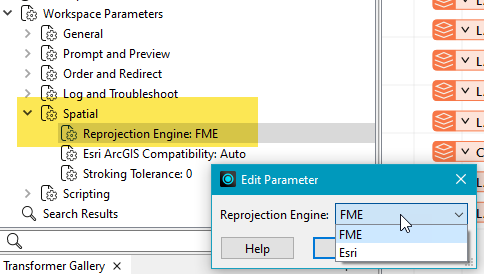
To perform a reprojection, FME typically uses the CS-MAP reprojection engine, which includes definitions for thousands of coordinate systems, with a large variety of projections, datums, ellipsoids, and units. However, GIS applications have slightly different algorithms for reprojecting data between different coordinate systems. To ensure that the data FME writes matches exactly to your existing data, you can use the reprojection engine from a different application.
To change the reprojection engine, Select Workspace Parameters > Spatial > Reprojection Engine. In the example shown, you can select Esri (but the selection here depends on your installed applications):
- The coordinate systems file coordsys.db in the FME installation folder contains the names and descriptions of all predefined coordinate systems.
- Some users may wish to use coordinate systems that do not ship with FME, and in those cases, FME also supports custom coordinate systems.
- Learn more about Working with Coordinate Systems in FME.
Advanced
XML Schema Document
Specifies the location for the XML Schema Document. If the parameter is not specified or if it does not contain a path, the XML schema document is generated in the same folder as the one specified through the Writer Dataset parameter.
Target Namespace Prefix
The parameter specifies the GML application schema target namespace prefix. The default value for this parameter is fme.
Target Namespace URI
This parameter specifies the GML application schema target namespace URI. The default value for this parameter is http://www.safe.com/gml/fme.
Note that a URI is a label only (usually an ownership identifier), and the XML Namespace specification does not require that the URI be used for information retrieval. Using a URI (rather than a simple string) to identify a namespace reduces the probability of different namespaces having duplicate identifiers.
Target Schema Location URL
This parameter is used only when the Schema Mode is set to FME Profile. This parameter specifies the URL schema location for the target namespace pair in the GML instance’s xsi:schemaLocation attribute.
Output Dataset Encoding
This parameter specifies the encoding that is to be used for the XML documents that GML2 writer outputs (for example, UTF-8).
Use wfs:FeatureCollection
Yes changes the root element in the output document <wfs:FeatureCollection>. The default value for this parameter is No.
XSLT Stylesheet to Apply
Specify an XSLT stylesheet to be applied to the final output document.
Stylesheet File to Write
This parameter only takes effect when it is used in conjunction with the XSLT Stylesheet to Apply parameter.
When set to Yes, a temporary file is written in the same folder at the location specified in the writer, the stylesheet is applied to the to temporary file and deleted after the stylesheet transform. and the result of the transformation is stored in the output dataset file.
Suppress Null Attribute
When set to Yes, this parameter suppresses printing of the attributes which are specified in the DEF lines but are not present in the FME features that are passed into the GML writer.
Write All Feature Types
- Yes – Every GML writer feature type is translated to the output GML application schema document as an XML Schema element declaration and a corresponding complex type definition.
- No (default) – Directs the writer to ignore those feature types that have no corresponding feature instances.
Documents to Write
Instructs the writer to write out only the .xsd document, only the .gml document, or both documents.
Suppress xsi:schemaLocationAttribute
This parameter suppresses the output of the xsi:schemaLocation attribute in the GML instance’s root element. The xsi:schemaLocation in an XML document instance is not a mandatory attribute – it is merely a hint that an XML processor may choose to ignore.
Setting this parameter to Yes suppresses the output of the xsi:schemaLocation attribute in the output GML instance. The default setting is No.
Lists in Multi-Value Attributes
This parameter allows the simple list attributes (the attributes that specified in the GML2 DEF lines with a “{}” suffix) to be carried in the FME features as multi-value attributes.
When set to Yes, the GML2 writer will not expect the FME features to contain simple list attributes; instead, every attribute that is defined in the DEF lines with a {} suffix is expected to be a single attribute such that its value is a token separated lists of values, a multi-value attribute.
Can be used in conjunction with: Multi-Value Separator
Multi-Value Separator
This parameter is valid when Lists in Multi-Value Attributes is set to Yes. It specifies the token separator (for example, a comma) used for the multi-value attributes that are to be treated as simple lists.
Schema Mode
Controls the GML2 writer operation mode.
Fixed Schema
The GML2 writer produces instance documents that conform to the FMEFeatures.xsd schema. The FMEFeatures.xsd file is in the folder <FME_installation>/xfMap. In most installations, this location is: C:\Program Files\FME_<version>\xfmap.
FME Profile
The GML2 writer creates two GML documents:
- a GML application schema, and
- a GML instant document that conforms to the schema
A third XML document may also be created. This document can be used by the XML Reader to read back into FME the GML instances that are created in this mode. The xfMap document is created in the same folder as the one that is specified in the Writer Dataset parameter. The document’s filename extension is .xmp and its filename basename is the same as that specified in Dataset.
Esri Profile
The GML2 writer produces instance documents that are formatted so they can be read by the Esri Interoperability GML extension.