Security
 Password
DWF files support an optional password for additional security. When specified, the file cannot be opened without the password.
Version
Format
The format of the DWF file to be produced.
Supported values:
- Compressed Binary (default)
- Uncompressed Binary
- ASCII
Version
The version of the DWF file to be produced.
Supported values:
- 4.2
- 5.5 (default)
- 6.0
The value corresponds with the release number of the DWF file that is produced.
Resolution
DWF file resolution can be determined at translation time in the form of the X Size and Y sizes, specified in pixels.
X Size
Specifies the horizontal width of the output DWF file in pixels.
Y Size
Specifies the vertical height of the output DWF file in pixels.
Miscellaneous Options
Optimize Colormap
Prevents unused colors in the color map from being stored in the DWF file.
Export Invisible Layers
Stores invisible layers in the DWF file and the usual visible layers.
Force Initial View to Extents
Sets the initial viewport of the DWF file to the entire extents instead of the last actively seen viewport.
Use Inked Area
Calculates a tight bounding area around the graphic elements of a drawing.
Skip Layer Info
Prevents additional layer information from being stored in the DWF file.
Skip Named Views
Prevents named views from being stored in the DWF file.
Spatial
Coordinate System
Coordinate systems may be extracted from input feature data sources, may come predefined with FME, or may be user-defined. FME allows different output and input coordinate systems, and performs the required coordinate conversions when necessary.
If a coordinate system is specified in both the source format and the workspace, the coordinate system in the workspace is used. The coordinate system specified in the source format is not used, and a warning is logged. If a source coordinate system is not specified in the workspace and the format or system does not store coordinate system information, then the coordinate system is not set for the features that are read.
If a destination coordinate system is set and the feature has been tagged with a coordinate system, then a coordinate system conversion is performed to put the feature into the destination system. This happens right before the feature enters into the writer.
If the destination coordinate system was not set, then the features are written out in their original coordinate system.
If a destination coordinate system is set, but the source coordinate system was not specified in the workspace or stored in the source format, then no conversion is performed. The features are simply tagged with the output system name before being written to the output dataset.
For systems that know their coordinate system, the Coordinate System field will display Read from Source and FME will read the coordinate system from the source dataset. For most other input sources, the field will display Unknown (which simply means that FME will use default values). In most cases, the default value is all you'll need to perform the translation.
You can always choose to override the defaults and choose a new coordinate system. Select More Coordinate Systems from the drop-down menu to open the Coordinate System Gallery.
Changing a Reprojection
To perform a reprojection, FME typically uses the CS-MAP reprojection engine, which includes definitions for thousands of coordinate systems, with a large variety of projections, datums, ellipsoids, and units. However, GIS applications have slightly different algorithms for reprojecting data between different coordinate systems. To ensure that the data FME writes matches exactly to your existing data, you can use the reprojection engine from a different application.
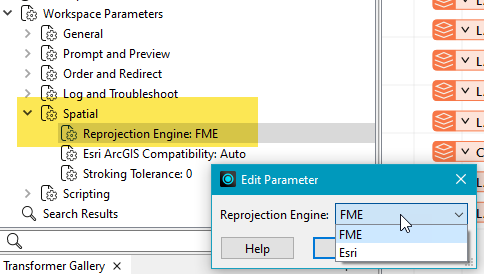
To change the reprojection engine, Select Workspace Parameters > Spatial > Reprojection Engine. In the example shown, you can select Esri (but the selection here depends on your installed applications):
- The coordinate systems file coordsys.db in the FME installation folder contains the names and descriptions of all predefined coordinate systems.
- Some users may wish to use coordinate systems that do not ship with FME, and in those cases, FME also supports custom coordinate systems.
- Learn more about Working with Coordinate Systems in FME.