Application Schema
XSD/ADE Selection
 CityGML Version
- Dataset (default) – The schemas are identified from the dataset's xsi:schemaLocation attribute.
- CityGML 3.0 – Uses the CityGML v3.0 schemas and their dependent XSD documents.
- CityGML 2.0 – Uses the CityGML v2.0 schemas and their dependent XSD documents.
- Other – The schemas are specified explicitly using the Application Schema and/or xsi:schemaLocation parameters, as outlined below.
Application Schema
This optional parameter specifies the location of the CityGML XSD Schema documents.
xsi:schemaLocation
This optional parameter specifies the location of the XSD Schema documents via whitespace-separated namespace-URI and xsd-location-URL pairs, following the same syntax as the xsi:schemaLocation attribute.
Settings
Appearance Themes
CityGML allows different thematic views in the same dataset, whereas FME geometries can have a single back and/or front FME Appearance.
This optional parameter scans the specified CityGML dataset file looking for available Appearance Themes. The selected Theme will be given priority when the CityGML textures and materials are applied to the front and/or back side of the FME geometries.
XML Namespace Declarations
The legal values for this parameter are white-space-separated XML namespace declarations as they would appear in an XML element.
This parameter allows different namespace declarations to be used, other than the ones extracted from the parsed XSD documents.
Include Appearance Features as Feature Types
Controls whether CityGML appearance elements (Appearance, X3DMaterial, ParameterizedTexture, and GeoreferencedTexture) are returned as separate FME features in addition to the CityObject features with which they are associated.
-
Yes — Each appearance element is returned as a separate FME feature, using its corresponding feature type (Appearance, X3DMaterial, ParameterizedTexture, or GeoreferencedTexture). These feature types are included in the reader schema and are output alongside CityObject features. This option is intended for workflows that require direct access to appearance information, such as inspecting themes, filtering textures, or modifying material properties.
-
No (default) — Appearance elements are not returned as separate features. They are still read from the dataset and applied to the geometries of their target CityObject features as FME texture and material appearances. The appearance feature types are not included in the reader schema. This setting is recommended for most workflows, including round-trip reading and writing. The CityGML 3 writer reconstructs appearance elements from geometry appearances, so emitting them as separate features may result in duplicate appearance elements in the output.
Add XML Namespace Prefix to
This parameter controls whether XML Namespace prefixes are applied to feature types, attributes, or both. The prefix will be separated from the names by an underscore.
- Feature Types – Includes the prefixes in the feature types. Setting this parameter to Feature Types is necessary if the XSD Schemas contains feature types with the same name in different namespaces.
- Feature Types (On Conflict) (default) – Includes the prefixes in feature types only when the XSD Schemas contain feature types with the same name in different namespaces.
- Feature Types and Attributes – Includes the prefixes in both the feature types and attributes.
Map Complex Properties as
Specifies whether GML properties that are defined as a complex type with complex content (that is, those that have embedded child elements) should be expanded into Nested Attributes within FME features, or stored as XML Fragments.
- If set to XML Fragments, complex properties are not expanded. Instead, their entire content is stored as XML text within a single attribute. This produces smaller, simpler feature structures and is suitable when detailed access to individual child elements is not needed.
- If set to Nested Attributes, complex properties are expanded into nested list attributes wherever possible, exposing their child elements directly as FME attributes. This option is useful when detailed access to individual elements or values is required for mapping or transformation, although it can produce large or deeply nested attribute structures. When using Nested Attributes, some complex properties that contain embedded objects or geometry elements may still be stored as XML fragments, depending on schema structure or other mapping limits.
Certain complex properties, such as those that are recursively defined or that would otherwise cause circular references, are always mapped as XML fragments regardless of this setting.
Limit Number of Lists in Nested Attributes
This optional parameter applies only when Map Complex Properties As is set to Nested Attributes.
It limits how many consecutive levels of multivalued nested list attributes (for example, lists within lists) are preserved before deeper levels are converted into XML fragments. When the nesting of list elements exceeds this number, expansion automatically stops at that level and deeper content is stored as XML fragments. This helps prevent extremely deep or repetitive data hierarchies from consuming excessive memory or producing unwieldy nested attribute structures.
If this parameter is not specified, all levels of nested lists are expanded up to the general safety limits. Setting a lower value restricts expansion to shallower lists, while a higher value allows deeper nesting at the cost of larger, more complex features.
In contrast, setting Map Complex Properties As to XML Fragments stores all complex properties as XML text after any embedded geometries or objects have been interpreted.
Restrict Feature Types to Dataset
- Yes (default) – Only the feature types present in the dataset will be created.
- No – All feature types defined in the CityGML core and any additional schema files will be created, regardless of whether they appear in the dataset.
Validate Dataset
Determines whether the reader should validate the specified dataset against the XSD schema.
Read <gml:boundedBy>
Specifies whether the predefined <gml:boundedBy> property should be processed.
- Yes – When this parameter box is checked, 2D bounding boxes are always interpreted as polygons. 3D bounding boxes can be interpreted as a polygon, a solid, or a wireframe; see the 3D Envelope As parameter for details.
- No (default) – When this parameter box is left unchecked, the <gml:boundedBy> element will be ignored.
3D Envelope As
Determines how a 3D <gml:boundedBy> envelope is interpreted when enabled.
|
Polygon |
Uses the lower and upper X,Y,Z coordinates to create a polygonal footprint. The Z values are discarded. |
|
Solid (default) |
Interprets the coordinates as a solid box geometry. |
|
Wireframe |
Interprets the coordinates as a multicurve representing the wireframe of a solid box geometry. |
Generic Attributes
Generic Attributes
Model Generic Attributes
Generic attributes are read as nested list attributes in both CityGML 2.0 and CityGML 3.0, setting this parameter to As Explicit Attributes instructs the reader to scan the dataset for generic attributes to extract the name, value and type of the generic attributes into regular FME attributes.
For example the following CityGML 3.0 generic string attribute:
<gen:StringAttribute>
<gen:name>architect</gen:name>
<gen:value>Frank Lloyd Wright</gen:value>
</gen:StringAttribute>
can be explicitly modeled as the FME attribute with name architect, type xml_buffer, and value Frank Lloyd Wright.
Generic Attribute Prefix
Adds the specified prefix to the explicitly mapped generic attribute name.
Schema Attributes
Additional Attributes to Expose
Use this parameter to expose Format Attributes in FME Workbench when you create a workspace:
- In a dynamic scenario, it means these attributes can be passed to the output dataset at runtime.
- In a non-dynamic scenario, this parameter allows you to expose additional attributes on multiple feature types. Click the browse button to view the available format attributes (which are different for each format) for the reader.
Spatial
Coordinate System
Coordinate systems may be extracted from input feature data sources, may come predefined with FME, or may be user-defined. FME allows different output and input coordinate systems, and performs the required coordinate conversions when necessary.
If a coordinate system is specified in both the source format and the workspace, the coordinate system in the workspace is used. The coordinate system specified in the source format is not used, and a warning is logged. If a source coordinate system is not specified in the workspace and the format or system does not store coordinate system information, then the coordinate system is not set for the features that are read.
If a destination coordinate system is set and the feature has been tagged with a coordinate system, then a coordinate system conversion is performed to put the feature into the destination system. This happens right before the feature enters into the writer.
If the destination coordinate system was not set, then the features are written out in their original coordinate system.
If a destination coordinate system is set, but the source coordinate system was not specified in the workspace or stored in the source format, then no conversion is performed. The features are simply tagged with the output system name before being written to the output dataset.
For systems that know their coordinate system, the Coordinate System field will display Read from Source and FME will read the coordinate system from the source dataset. For most other input sources, the field will display Unknown (which simply means that FME will use default values). In most cases, the default value is all you'll need to perform the translation.
You can always choose to override the defaults and choose a new coordinate system. Select More Coordinate Systems from the drop-down menu to open the Coordinate System Gallery.
Changing a Reprojection
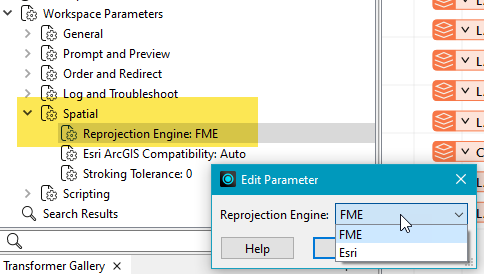
To perform a reprojection, FME typically uses the CS-MAP reprojection engine, which includes definitions for thousands of coordinate systems, with a large variety of projections, datums, ellipsoids, and units. However, GIS applications have slightly different algorithms for reprojecting data between different coordinate systems. To ensure that the data FME writes matches exactly to your existing data, you can use the reprojection engine from a different application.
To change the reprojection engine, Select Workspace Parameters > Spatial > Reprojection Engine. In the example shown, you can select Esri (but the selection here depends on your installed applications):
- The coordinate systems file coordsys.db in the FME installation folder contains the names and descriptions of all predefined coordinate systems.
- Some users may wish to use coordinate systems that do not ship with FME, and in those cases, FME also supports custom coordinate systems.
- Learn more about Working with Coordinate Systems in FME.
GML SRS Axis Order
Overrides the axis order when reading coordinate tuples in a CityGML <pos> or <posList> element.
Valid values:
- 1,2
- 2,1
- 1,2,3
- 2,1,3
The legal values for this parameter are white-space-separated XML namespace declarations as they would appear in an XML element.
GML SRS Dimension
Controls how coordinate dimensionality is determined when a GML SRS Axis Order is set.
When an axis order is set, its axis count (2 for 1,2 / 2,1; 3 for 1,2,3 / 2,1,3) may differ from the dimensionality declared in the data (for example, via srsDimension). This parameter controls which takes precedence when the two conflict.
Valid values:
-
Preserve Input — The dimensionality from the data is used regardless of the axis order. A dataset with srsDimension="3" retains its Z coordinate even when a 2D axis order is set; a dataset with srsDimension="2" remains 2D even when a 3D axis order is set.
-
Follow Axis Order — The dimensionality is derived from the axis order count. A 2D axis order (1,2, 2,1) forces 2D output; a 3D axis order (1,2,3, 2,1,3) forces 3D output, regardless of what the data declares.
Default: Preserve Input (when this parameter is not set)
Map Geometry Columns
Specifies whether the CityGML geometric properties should be represented as attributes in the FME feature type definitions.
- Yes (default) – The feature type definitions will contain the geometry names as attributes, and their type is set to xml_geometry. If an attribute X has its type set to xml_geometry, this attribute X becomes a placeholder in the feature type definition. It is a placeholder because actual data features for the feature type definitions will not have this attribute; instead, the data features will have a geometry named “X”.
- No – The feature type definition will not contain geometry names.