
FME Form: 2026.3
Missing or Unavailable Transformers
You may open a workspace that references transformers that are missing in your deployment of FME Form. This can happen, for example, if:
- A workspace is shared with you that references a transformer package obtained from FME Hub, but you have not yet downloaded the package.
- A workspace is opened that references a newer version of a transformer that is not available in your version of FME.
Before a workspace opens or saves, a message displays warning of any unavailable transformers. If you choose to continue without attempting to rectify (for example, downloading the required package), the workspace displays with references to the missing transformers, in both the Navigator and on the canvas.
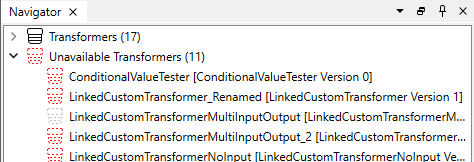
In the Navigator, under Unavailable Transformers:
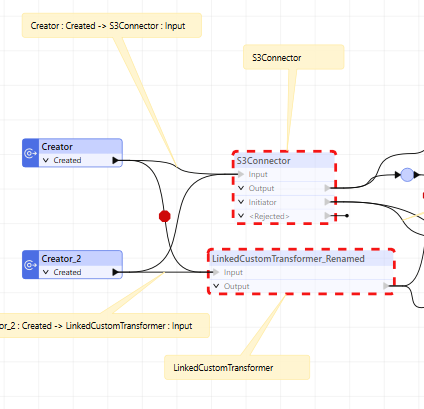
On the canvas, in dotted outline, and showing the original positions of input and output connections:
You can right-click on a missing transformer, in either the Navigator or canvas, to perform some limited actions, such as removing.
Workspaces with missing transformers cannot be run.
Getting Information About Missing Transformers
To view more details about a missing transformer, right-click on its reference node in either the Navigator or canvas, and select Error and Raw Parameters. The Unavailable Transformer Details pane opens, which provides information that may be useful in recreating the transformer, including the raw data of any recoverable parameter settings. In the Parameters table, you can click in each cell to open its corresponding editor, which may provide additional details.