
FME Form: 2025.2
You can link any number of workspace parameters to use the same value as a visible or hidden user parameter.
Example
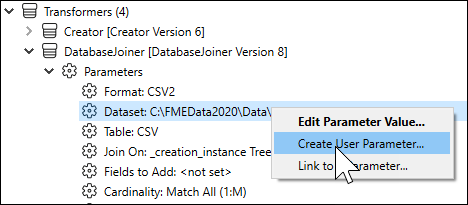
In this example, there are three DatabaseJoiner transformers, which all join to the same database. Create a user parameter from one of the DatabaseJoiner source parameters in the Navigator:
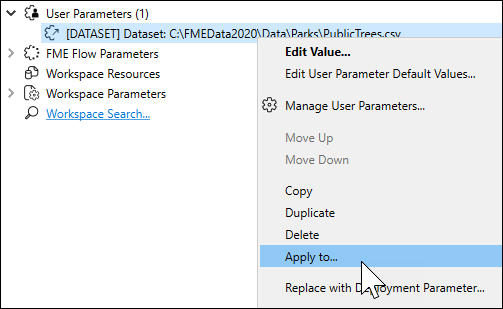
Click the parameter in the Navigator, and select Apply To:
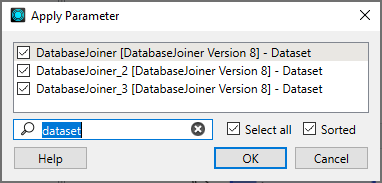
Filter the list and click each DatabaseJoiner source parameter. Then click OK.
On the first DatabaseJoiner, the source dataset has already been made visible. When you run this workspace, you will be prompted for the location of the database. Then the source for DatabaseJoiner_2 and DatabaseJoiner_3 are set to use the user parameter value defined in the first DatabaseJoiner.
When the workspace is run, you are still only prompted for one source, but the same value will be used for the other DatabaseJoiners. Regardless of how many other parameters are set to use the first DatabaseJoiner, changing this one parameter affects all the parameters that depend on it.
Note The names in the Apply Parameter list will be reflected in the properties of both visible and hidden user parameters.
Removing Parameter Links
To remove any parameter from the group, right-click and select Unlink from User Parameter.