To access feature type parameters, click the gear icon  on a feature type in the workspace. This opens the Feature Type Parameter Editor.
Tip: To always display the editor in Workbench, you can select View > Windows > Parameter Editor.
General
All feature types share similar General parameters, which may include Feature Type Name, Reader or Writer information, and Geometry.
In most Writer Feature Type parameter dialogs, you can also control Dynamic Schema Definitions. Some database formats accept Table or Index Qualifier prefixes on the output table feature type.
Table Settings: General
 Feature Operation
This parameter specifies how features will be written into the destination table. Supported feature operations are described below. Note that the described behavior can be dependent on the selected options, as well as the underlying table properties.
- More information about Feature Operations.
|
Option |
Description |
If the Row Does Not Exist |
If the Row Exists |
|
Insert |
The writer appends a new row to a table using input feature attributes. |
The writer creates a new row using input feature attributes. |
Not always applicable: if the table does not have a unique key or it has an automatically generated unique key, insertion is always possible. The database cannot violate its key constraints; therefore, errors can occur on row insertion. For example, if there is a unique key and a user specifies the value with the feature, and the feature already exists, then Workbench logs an error. This error might be in the form of a rejected feature, or the database may stop processing altogether. |
|
Update |
The writer updates existing row(s) in a table using input feature attributes. A selection method must be specified in the Row Selection group. |
The writer rejects the input feature or logs an error if it is unable to continue. |
The writer only changes values of the existing row(s) corresponding to the input feature that differ from the input feature. |
|
Upsert |
The writer updates the existing row(s) in a table using input feature attributes if the specified conflict arises. If no conflicts arise, the writer appends a new row to a table using input feature attributes. |
The writer creates a new row using input feature attributes. |
If the specified conflict arises, the writer will change only values of the existing row(s) corresponding to the input feature that differ from the input feature. If other conflicts arise, the writer will reject the input feature or log an error if it is unable to continue. |
|
Delete |
The writer deletes an existing row(s) in a table. A selection method must be specified in the Row Selection group. |
The writer rejects the input feature or logs an error if it is unable to continue. |
The writer deletes existing row(s) corresponding to the input feature. |
|
fme_db_ |
The feature operation will be determined by the attribute fme_db_operation on each input feature. A selection method must be specified in the Row Selection group. The value of fme_db_operation will be processed according to the steps below. Note: The processing steps listed below depend on a format's available Feature Operation options.
Note about earlier FME versions: To use fme_db_operation, you must set Feature Operation to this option. In previous versions of FME, you could set fme_db_operation when the destination feature type was set to Insert, Update, Upsert, or Delete. Doing this now will cause feature rejection. |
The action depends on the operation; however, in general, if nothing is specified, the value is treated as an Insert. | The value is treated as an Insert. |
Table Handling (also called List Handling in some formats)
Controls how the feature type handles destination tables or lists:
- Use Existing – Write to an existing table or list. If the destination table/list does not exist, the translation will fail.
- Create If Needed – Create the destination table/list if it does not exist.
- Drop and Create – (This option is not available for all formats.) Drop the destination table/list if it exists, and then create it. The writer will drop and re-create the table before writing any features to it. Tables will be overwritten when the first input feature is processed. If no features are sent to a feature type, then the corresponding table will not be overwritten.
- Truncate Existing – (This option is not available for all formats.) If the destination table/list does not exist, the translation will fail. Otherwise, delete all rows from the existing table or list.
Row Selection
|
Feature Operation Option |
Row Selection |
|---|---|
|
Insert |
Row Selection is ignored. |
|
Update, Upsert, Delete (Options may differ depending on a format's available Feature Operation options.) |
A Row Selection condition needs to be specified for selecting which rows to operate on. |
This parameter group offers two methods to construct the selection condition:
Match Columns
The columns specified in the corresponding column picker dialog will be used for matching destination rows. All matching rows will be selected for update, upsert, or delete. If any feature attributes corresponding to the specified match columns contain null or missing values, the feature will be rejected.
Note: This is the only supported method for Upsert feature operation.
WHERE Clause
This parameter opens a WHERE Clause Builder. You can also type a WHERE clause inline, without launching the Builder. It is optional to start the clause with the word WHERE.
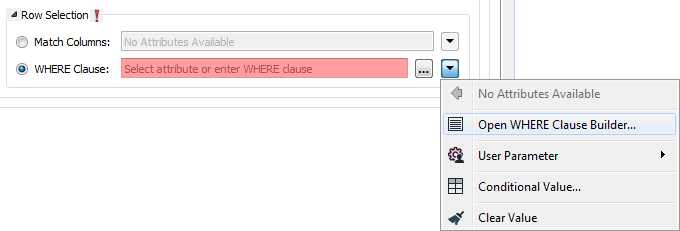
The WHERE Clause Builder makes it easy for users to reference feature attribute values, destination table columns, and invoke FME functions. The WHERE clause is first evaluated as an FME expression, before being passed onto the destination database.
If the WHERE clause is incorrect or if its evaluation results in failure, the translation will fail. Otherwise, if the WHERE clause passes FME evaluation but it is SQL invalid, the feature will be rejected or the translation will fail.
For advanced users, conditional FME expressions created through the Conditional Value editor can be used to create WHERE clauses.
Tip: You can set the WHERE Clause to an attribute. This supports workspace migration and existing workflows involving fme_where. (Direct support for fme_where has been deprecated.) To advanced users who are accustomed to using fme_where, if Feature Operation is set to Update, Upsert, Delete, or fme_db_operation, an fme_where attribute that conflicts with Match Columns or WHERE Clause will result in feature rejection.
Table Creation
Create with OIDs
Specifies whether or not a system OID (object identifier) column should be created.
OIDs are not guaranteed to be unique feature identifiers, and their use is deprecated outside of system tables. If set to No, then the OID column is not created.
Table Settings: Advanced
Vacuum Analyze Table
Determines if the database function to vacuum and analyze the table is performed once the table is successfully written. This will build statistics for the table.
Allow Serial Column Writing
Values cannot usually be written to serial columns; available values come from the database. This writer option allows the writer to take values from incoming features.
If one of the attributes on an incoming feature corresponds with a serial column in the database table, there are two options:
- No (default) – The value will come from the database sequence.
- Yes – The value will come from the feature (which is the same behavior as other column types).
Note: For more information on SERIAL data types, see PostgreSQL documentation, section 8.1.4. Serial Types.
(Note that in PostgreSQL, serial columns are equivalent to a sequence.)