Note: To use SpatialWare, you must install and configure the Informix ODBC Client software.
Database Connection
 ODBC Data Source
The name of the ODBC data source from which the features are retrieved. This is required no matter what the underlying RDBMS of SpatialWare.
Database Type
Identifies the type of database the SpatialWare server is operating on.
SpatialWare Version
The version number of the SpatialWare server you are using. This is not the version of the database itself, but rather the version of the SpatialWare DataBlade.
Username and Password
Enter the username and password to access the service.
Constraints
Tables
After specifying the database connection, click the Browse button (...) to select tables for import. A connection window appears while the system retrieves the tables from the database.
Once the Select Tables dialog appears, you can select one or more tables. Click OK to dismiss the window and add the selected table name(s) to the Tables parameter.
Freeform Query
Feature Type
The feature type name entered here must match a table in the database. This will be used as the feature type of all the features read from the table.
SQL Statement
Enter any freeform SQL query to query the database.
If no SQL Statement is specified, all rows in the table will be read and returned as individual features. If an SQL Statement is specified, only those rows that are selected by the clause will be read. The SQL Statement will be included in a constructed SQL statement and passed untouched to the database (and therefore may make use of any of SpatialWare's SQL/Spatial predicates).
Use Search Envelope
Using the minimum and maximum x and y parameters, define a bounding box that will be used to filter the input features. Only features that intersect with the bounding box are returned. (Note that this is the bounding box intersection only, and not a full geometry intersection that would be returned by a transformer like the SpatialFilter.)
If all four coordinates of the search envelope are specified as 0, the search envelope will be disabled.
Clip to Search Envelope
When selected, this parameter removes any portions of imported features being read that are outside the Search Envelope.
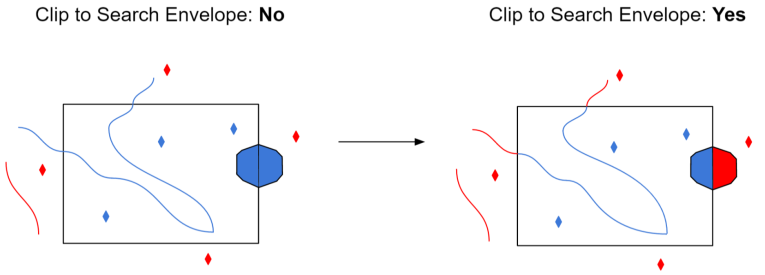
The example below illustrates the results of the Search Envelope when Clip to Search Envelope is not selected (set to No) and when it is selected (set to Yes).
- No: Any features that cross the search envelope boundary will be read, including the portion that lies outside of the boundary.
- Yes: Any features that cross the search envelope boundary will be clipped at the boundary, and only the portion that lies inside the boundary will be read. The underlying function for the Clip to Search Envelope function is an intersection; however, when Clip to Search Envelope is selected, a clipping operation is also performed in addition to the intersection.