The XML Reader works by mapping XML elements into FME features. These mappings can be defined by Feature Paths or by an XML application called xfMap. By allowing the user to configure these mapping strategies, the XML Reader is not tied to any particular XML format. Because of this, the XML Reader can read many disparate XML applications, ranging from GIS data to XML messages or metadata. In most cases, Feature Paths is the preferred way to read XML because the user experience is more intuitive and easier to configure.
Reading XML using Feature Paths or xfMaps is described in more detail in xfMap
Reader Configuration
 Configuration Type
Specifies whether to read the XML dataset using Feature Paths, an xfMap document, or an XRS document.
Note: The selected configuration type determines which parameters become available in the dialog.
Max Schema Scan Features
Sets a limit for the number of data features scanned for determining schema features. This option is useful during workspace generation when processing a very large XML file, and you know that the entire file does not have to be read to completely determine the feature type definitions.
Valid values: any positive number.
Feature Paths Configuration
Elements to Match
Specifies which XML elements in the dataset, expressed as xfMap match expressions, should be extracted into features containing XML fragments. Multiple expressions can be separated with whitespace. The fragments are held in non-geometrical FME features under their xml_fragment attribute. For more information about additional attributes added to extracted features, see XFMAP_FEATURE_PATHS, XFMAP_FEATURE_PATHS_EXCEPT.
This parameter is useful for deconstructing large XML documents into parts that may be processed further in XML, XQuery, XSLT or text processing Workbench transformers.
This example extracts the children of the <dc:SearchResults> element from the dataset into XML fragment features:
XML_XFMAP_FEATURE_PATHS “csw:SearchResults/*”
Elements to Exclude
Specifies which XML elements in the dataset, expressed as xfMap match expressions, should be excluded from extraction into features. This parameter is especially useful for match expressions containing wildcard characters. Multiple expressions can be separated with whitespace.
This example excludes extraction of the <csw: metadata> children of the <dc:SearchResults> element from the dataset into XML fragment features:
XML_XFMAP_FEATURE_PATHS_EXCEPT "csw:SearchResults/csw:metadata"
Customize Attributes
Elements as XML Fragments
This parameter can be specified to extract the children of the matched elements as xml fragments.
For example, If Flatten Options is shipto and this parameter is set to country, then the output feature has an extra attribute xml_fragment_country{0} with its value set to <country>Norway</country>.
Flatten Options
This option allows children of the matched elements to be exposed as attributes on FME Features.
See the Structure Element section in the xfMap documentation for details regarding the options available and more examples.
Other Configurations
xfMap File
If the Configuration Type parameter is xfMap, this parameter identifies the location of the xfMap document. Multiple xfMap files may be specified here.
XRS File
If the Configuration Type parameter is XRS, this parameter identifies the location of an XRS document. An XRS (XML Reader Switch) document allows the XML Reader to automatically configure itself to read "known" XML datasets without the need to specify the appropriate xfMaps in advance.
OpenxfMap
If there is no Feature Path or xfMap provided, FME makes a best guess and uses xfMaps it finds internally to try to parse it. However, the results will be unpredictable and the xfMap that FME is attempting to use, if any, will be written in the log. In this case, the XML reader is using the AIXM xfMap to try to read the source data:
INFORM|The XML Reader is using xfMap 'C:\Apps\FME\xml\aixm\aixm_4_5_xfmap.xml'
Continue on Geometry Error
Continue on Geometry Error
Specifies whether the reader should continue to extract features from the XML dataset after encountering a geometrical error.
Schema Attributes
Additional Attributes to Expose
Use this parameter to expose Format Attributes in Workbench when you create a workspace:
- In a dynamic scenario, it means these attributes can be passed to the output dataset at runtime.
- In a non-dynamic scenario, this parameter allows you to expose additional attributes on multiple feature types. Click the browse button to view the available format attributes (which are different for each format) for the reader.
Use Search Envelope
Using the minimum and maximum x and y parameters, define a bounding box that will be used to filter the input features. Only features that intersect with the bounding box are returned.
If all four coordinates of the search envelope are specified as 0, the search envelope will be disabled.
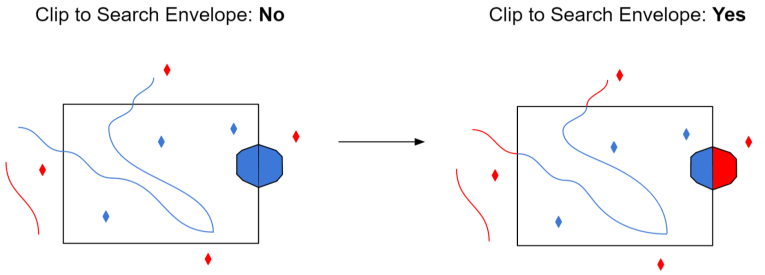
Clip to Search Envelope
When selected, this parameter removes any portions of imported features being read that are outside the Search Envelope.
The example below illustrates the results of the Search Envelope when Clip to Search Envelope is not selected (set to No) and when it is selected (set to Yes).
- No: Any features that cross the search envelope boundary will be read, including the portion that lies outside of the boundary.
- Yes: Any features that cross the search envelope boundary will be clipped at the boundary, and only the portion that lies inside the boundary will be read. The underlying function for the Clip to Search Envelope function is an intersection; however, when Clip to Search Envelope is selected, a clipping operation is also performed in addition to the intersection.
Advanced
Validate XML Map File
Specifies whether the input xfMap document should be validated against its Document Type Definition (DTD).
Validate XML Dataset File
Specifies whether the input XML document should be validated against a Document Type Definition (DTD) or an XML schema.