|
About Database Connections |
|---|
|
Database formats include a Database Connection parameter that defines and stores authentication information. For general information about sharing database connections, please see Using Database Connections. Note that Database Connection parameters differ slightly, depending on context and/or database format. |
|
Connection From the Connection parameter in a database format, you can do one of the following:
|
|
Connection Parameters (Add Database Connection dialog) |
|---|
 Server Server
The host name of the Microsoft SQL Server or Azure SQL Database. (It is not necessary to specify a port if a default configuration is used.) If you have configured your Microsoft SQL Server database to use a non-standard port number, you can specify this port here. The correct syntax is: <Host>[\<Instance>][:<port>] Database
To initiate a database connection, enter (or browse for) the database name. Authentication
Username and Password: Enter the username and password to access the service. Encrypt Connection
Note: This parameter is not present in the Azure SQL Database reader and writer. The Azure SQL Database reader and writer will always request Secure Sockets Layer (SSL) encrypted connections. When selected, this parameter requests Secure Sockets Layer (SSL) encryption for the connection. If the server does not have a certificate trusted by the client machine, the connection will fail. Otherwise, data will be encrypted before traveling over the network. There are multiple ways to trust a server certificate on a client machine. If this parameter is not selected, encryption behavior will be determined by encryption properties set for SQL Server Native Client, and for SQL Server. Tip: When Encrypt Connection is selected, please provide a fully qualified Server name. For example, a server named safe-sql-server might have a fully qualified name of safe-sql-server.dev.safe. This fully qualified name should be an exact match for the server name on the trusted certificate. |
Command Timeout (Seconds)
The time, in seconds, after which to terminate a query to the database if it has not yet returned a result.
If set to 0, there is no timeout. The default is 30.
Note: If this value is not set high enough, then the query will return the error Provider Error - Timeout Expired.
Constraints
Tables
After specifying the database connection, click the Browse button (...) to select tables for import. A connection window appears while the system retrieves the tables from the database.
Once the Select Tables dialog appears, you can select one or more tables. Click OK to dismiss the window and add the selected table name(s) to the Tables parameter.
WHERE Clause
This optional specification is used to limit the rows read by the reader from each table. This example selects only the features whose lengths are more than 2000:
LENGTH > 2000
Schema Attributes
Additional Attributes to Expose
Use this parameter to expose Format Attributes in Workbench when you create a workspace:
- In a dynamic scenario, it means these attributes can be passed to the output dataset at runtime.
- In a non-dynamic scenario, this parameter allows you to expose additional attributes on multiple feature types. Click the browse button to view the available format attributes (which are different for each format) for the reader.
Advanced
Application Intent
Declares the application workload type when connecting to a server in an Always On environment.
- ReadWrite (default) – The driver connects to a read-write node.
- ReadOnly – The client requests a read workload when connecting. The server enforces the intent at connection time.
Number Of Records To Fetch At A Time
The number of rows that are retrieved at one time into local memory from the data source. For example, if the value is set to 10000, the reader reads 10,000 rows into local memory, and processes features from this memory buffer. After the reading the last row, the reader retrieves the next 10,000 rows from the data source.
Note: If this parameter is incorrectly set, it will cause significantly degraded performance. The optimum value depends primarily on the characteristics of individual records and the transport between the database and the client machine. It is less affected by the quantity of rows that are to be retrieved. The optimal value is the default value set for the format (for example, 1 for PostGIS Raster, 10000 for PostGIS, or 10 for Microsoft SQL Server).
SQL to Run Before Read
This parameter allows for the execution of SQL statements before opening a table for reading. For example, it may be necessary to create a temporary view before attempting to read from it.
For detailed information about SQL functions, click the corresponding menu item in the SQL to Run editor help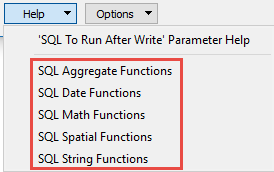 .
.
Available menu options depend on the format.
Multiple SQL commands can be delimited by a character specified using the FME_SQL_DELIMITER directive, embedded at the beginning of the SQL block. The single character following this directive will be used to split the SQL block into SQL statements, which will then be sent to the database for execution. Note: Include a space before the character.
For example:
FME_SQL_DELIMITER ;
DELETE FROM instructors ;
DELETE FROM people
WHERE LastName='Doe' AND FirstName='John'
Multiple delimiters are not allowed and the delimiter character will be stripped before being sent to the database.
Any errors occurring during the execution of these SQL statements will normally terminate the reader or writer (depending on where the SQL statement is executed) with an error. If the specified statement is preceded by a hyphen (“-”), such errors are ignored.
SQL To Run After Read
This parameter allows for the execution of SQL statements after a set of tables has been read. For example, it may be necessary to clean up a temporary view after creating it.
For detailed information about SQL functions, click the corresponding menu item in the SQL to Run editor help.
Available menu options depend on the format.
Multiple SQL commands can be delimited by a character specified using the FME_SQL_DELIMITER directive, embedded at the beginning of the SQL block. The single character following this directive will be used to split the SQL block into SQL statements, which will then be sent to the database for execution. Note: Include a space before the character.
For example:
FME_SQL_DELIMITER ;
DELETE FROM instructors ;
DELETE FROM people
WHERE LastName='Doe' AND FirstName='John'
Multiple delimiters are not allowed and the delimiter character will be stripped before being sent to the database.
Any errors occurring during the execution of these SQL statements will normally terminate the reader or writer (depending on where the SQL statement is executed) with an error. If the specified statement is preceded by a hyphen (“-”), such errors are ignored.