Dataset Parameters
 Feature Type Name(s)
This parameter allows you to choose different naming schemes, and the number of feature types generated for the reader.
Feature type name choices:
- From File Name(s): Generates one feature type per source filename.
- From Format Name: Produces only a single feature type containing the format name.
Schema Attributes
Additional Attributes to Expose
Use this parameter to expose Format Attributes in Workbench when you create a workspace:
- In a dynamic scenario, it means these attributes can be passed to the output dataset at runtime.
- In a non-dynamic scenario, this parameter allows you to expose additional attributes on multiple feature types. Click the browse button to view the available format attributes (which are different for each format) for the reader.
Use Search Envelope
Using the minimum and maximum x and y parameters, define a bounding box that will be used to filter the input features. Only features that intersect with the bounding box are returned.
If all four coordinates of the search envelope are specified as 0, the search envelope will be disabled.
Clip to Search Envelope
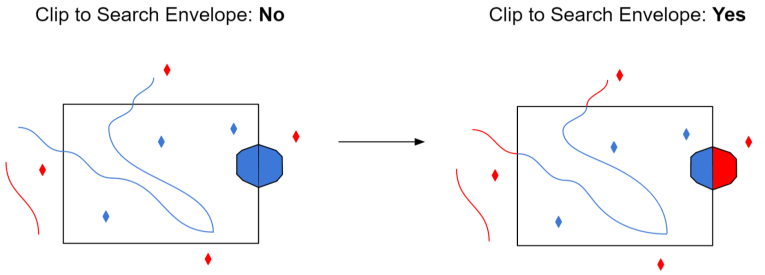
When selected, this parameter removes any portions of imported features being read that are outside the Search Envelope.
The example below illustrates the results of the Search Envelope when Clip to Search Envelope is not selected (set to No) and when it is selected (set to Yes).
- No: Any features that cross the search envelope boundary will be read, including the portion that lies outside of the boundary.
- Yes: Any features that cross the search envelope boundary will be clipped at the boundary, and only the portion that lies inside the boundary will be read. The underlying function for the Clip to Search Envelope function is an intersection; however, when Clip to Search Envelope is selected, a clipping operation is also performed in addition to the intersection.
Advanced
Prefer File Coordinate System Units
This parameter applies only when the georeferencing of the JPEG2000 dataset is stored via an embedded GeoTIFF.
- When the parameter is set to Yes and the ProjLinearUnitsInterpCorrectGeoKey flag is present in the file, the coordinate system offsets will be assumed to be in the linear units of the projection.
- When the value is set to No or the ProjLinearUnitsInterpCorrectGeoKey flag is not present, the Offsets in Coordinate System Units parameter (see below) is used to determine the interpretation of the coordinate system offsets.
Offsets in Coordinate System Units
This parameter applies only when the georeferencing of the JPEG2000 dataset is stored via an embedded GeoTIFF.
- Yes: The coordinate system offsets stored in the GeoTIFF file will be interpreted as being in the linear units of the projection; this is correct according to the GeoTIFF specification.
- No: The coordinate system offsets will be interpreted as being in meters; this is what is actually done in practice by many software packages.
Note that if the offsets are explicitly marked as being in the coordinate system units (via the ProjLinearUnitsInterpCorrectGeoKey flag), and Prefer File Coordinate System Units (above) is set to Yes, this option is ignored.
Cache Size Calculation
This parameter specifies how FME should calculate the JPEG2000 compression cache size.
- Auto (default) – FME will calculate a cache size that is appropriate for the size of the raster data. This option should be preferred.
- Manual – FME will use the value of the Compression Cache Size (MB) parameter. This option should be used if a cache error occurs. The error will contain information about the prescribed manual cache size.
Compression Cache Size (MB)
This parameter specifies the size of the JPEG2000 compression cache in megabytes (MB).
This parameter is only enabled when the Cache Size Calculation parameter is set to Manual.