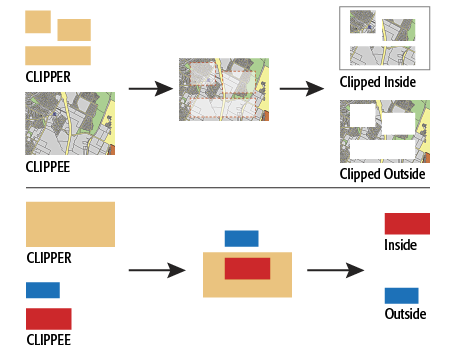
Performs a geometric clipping operation.
This transformer takes a number of clip boundaries (clippers) and a number of features to be clipped (clippees). The output is split into two groups.
If Group By attributes are selected, features with the same values in the Group By attributes are placed into the same set, and clipping occurs in each set independent of other sets.
How parallel processing works with FME: see About Parallel Processing for detailed information.
This parameter determines whether or not the transformer should perform the work across parallel processes. If it is enabled, a process will be launched for each group specified by the Group By parameter.
| Parameter | Number of Processes |
|---|---|
| No Parallelism | 1 |
| Minimal | coresThe processor, or CPU, is the physical part of the computer that performs mathematical calculations. It is the most important part of a computer system. Traditional processors have only one core on the processor, meaning that at any given time, only one set of calculations is being performed. If a processor is dual-core, this means the single chip contains hardware for two processors, now called cores to distinguish them from the single chip, running simultaneously, side by side. (Source: http://www.ehow.com/facts_5730257_computer-core-processors_.html) / 2 |
| Moderate | exact number of cores |
| Aggressive | cores x 1.5 |
| Extreme | cores x 2 |
For example, on a quad-core machine, minimal parallelism will result in two simultaneous FME processes. Extreme parallelism on an 8-core machine would result in 16 simultaneous processes.
You can experiment with this feature and view the information in the Windows Task Manager and the Workbench Log window.
If the Merge Attributes parameter is enabled, any CLIPPEE that is clipped will receive the attributes from the CLIPPER feature. In such a case, the Merge Attribute Prefix parameter can be used to give the CLIPPER's attributes a prefix before they are added to the CLIPPEE.
This attribute (if specified) will be added with a value of “yes” to any features output via either the INSIDE or OUTSIDE port which were cut by the transformer, and a value of “no” to any output features which were not changed by the transformer.
This parameter directs what action should be taken with CLIPPEE features that lie entirely on the boundary of the clipper.
If the Create Aggregates parameter is No, then features that are clipped into multiple parts will not be aggregated, but rather each part will be output as a separate feature.
If this parameter is set to No, the INSIDE rasters which were clipped will be equal to the intersections of the clippers and clippees. Otherwise, the intersections will be padded by nodata so that the extents are identical to those of the input rasters.
If Advanced Geometry Handling is set to Enhanced in the workspace, arcs and ellipses will be clipped without stroking. If set to Classic, all arcs and ellipses will be replaced by their center points.
About Transformer Parameter Options
See FMEpedia for additional information about this transformer.
Search for samples and information about this transformer on FMEpedia.
Keywords: MBR "minimum bounding rectangle" raster grid clip clipper clippee subset extent sample bound clean conflation overshoot undershoot